
What if I say, you don't need to code a single line to perform enterprise-level integration? Yes, you heard right. Salesforce is all about low coding, but still, we as developers are writing code to perform different types of integration. In my first blog, I came across the SKYVVA Data Loader and worked with it as the replacement of the Salesforce Data Loader. SKYVVA provides not only easy data loading and importing as we know with the data loader — SKYVVA provides more: complex, enterprise-class integration that is hard to achieve with the API approach alone. It is a very powerful tool which provides integration with various advanced features and with no coding.
The Salesforce Standard API
Let's first understand what the standard ways to do integration in Salesforce are. I will briefly outline the different types of APIs that we can use for integration and manipulating Salesforce organization data. For the complete API documentation please refer to the Salesforce official help site.
Let's have a look at the different APIs:
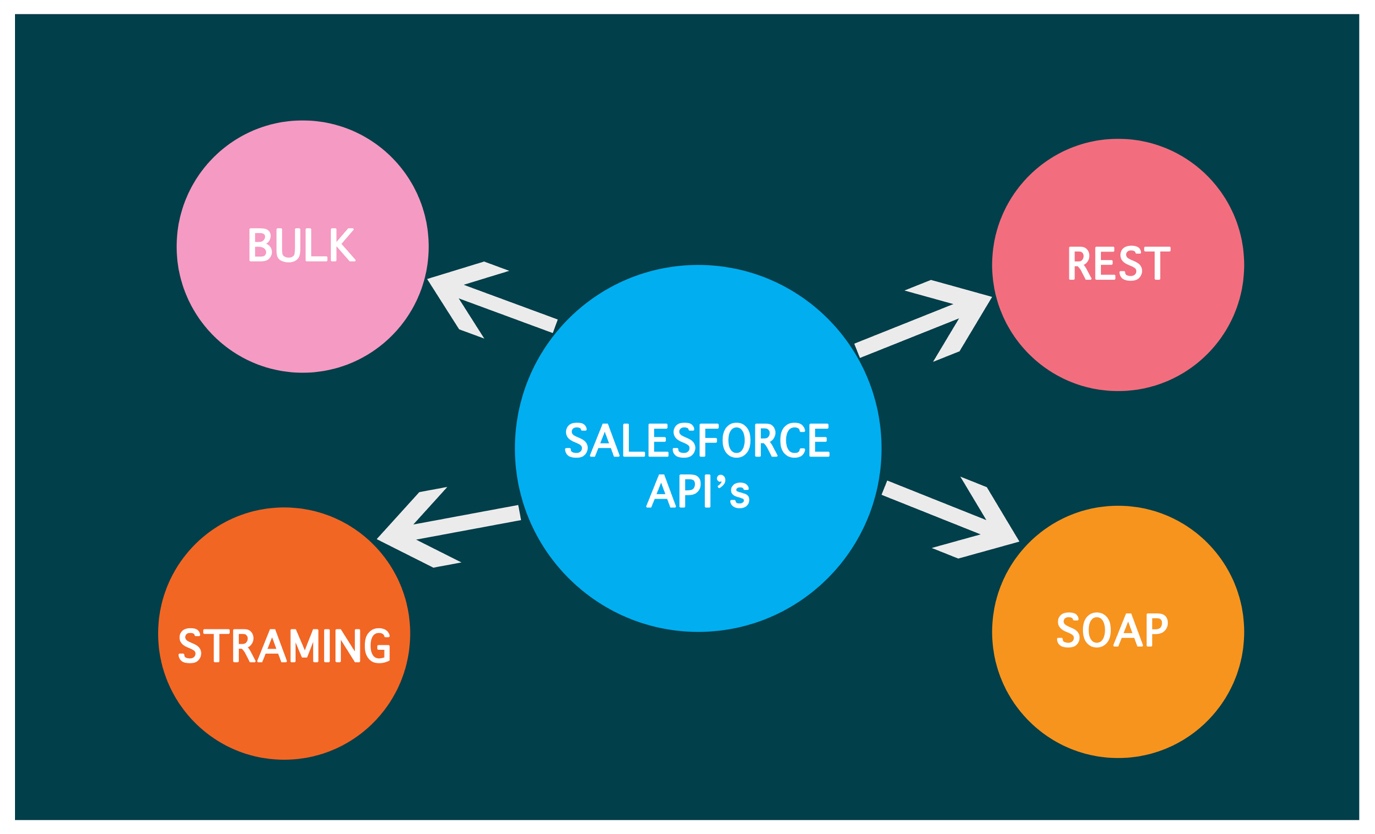
Overview of Salesforce API types
REST API
REST API is a simple and powerful web service based on RESTful principles. It exposes all sorts of Salesforce functionality via REST resources and HTTP methods. For example, you can create, read, update, and delete (CRUD) records, search or query your data, retrieve object metadata, and access information about limits in your org. REST API supports both XML and JSON. Because REST API has a lightweight request and response framework and is easy to use, it's great for writing mobile and web apps.
SOAP API
SOAP API is a robust and powerful web service based on the industry-standard protocol of the same name. It uses a Web Services Description Language (WSDL) file to strictly define the data transfer format. SOAP API supports more Salesforce functionality than REST API.
Bulk API
Bulk API is a specialized RESTful API for loading and querying lots of data at once. By lots, we mean 50,000 records or more. Bulk API is designed to be asynchronous, meaning you can submit requests without waiting for each operation to complete.
Streaming API
Streaming API is a specialized API for setting up notifications that trigger when changes are made to your data. It uses a publish-subscribe model in which clients can subscribe to channels that broadcast notifications.
API Limits
Total limits vary by org edition, license type, and expansion packs that you purchase. For example, an Enterprise Edition has 1,000 concurrent API requests and 1,000,000 requests per 24 hours by default.
Which API to use in which case?
Choosing the right API for your integration needs is an important decision. Here's some information on the most commonly used APIs and their use cases:
When to Use REST API
REST API provides a powerful, convenient, and simple REST-based web services interface for interacting with Salesforce. You can use it to create, read, update, and delete records and retrieve metadata. Use REST API when you're building a mobile or web app and want to interact with Salesforce.
When to Use SOAP API
SOAP API provides a powerful, convenient, and simple SOAP-based web services interface for interacting with Salesforce. For example, you can use SOAP API to integrate Salesforce with your org's ERP and finance systems. You can also deliver real-time notifications when your data is changed.
When to Use Bulk API
Bulk API is based on REST principles and is optimized for loading or deleting large sets of data. You can use it to query, insert, update, upsert, or delete millions of records. The easiest way to use Bulk API is to enable it for processing records in Data Loader using CSV files.
When to Use Streaming API
Use Streaming API to receive near-real-time streams of data that are based on changes in Salesforce records or custom payloads. Use the type of streaming event that suits your needs:
- Push Topic Event – Receive changes to Salesforce records based on a SOQL query that you define.
- Change Data Capture Event – Receive changes to Salesforce records with all changed fields.
- Platform Event – Publish and receive custom payloads with a predefined schema. The data can be anything you define, including business data.
- Generic Event – Publish and receive arbitrary payloads without a defined schema.
Nature of API and its principal use case
Now that we've seen the different available APIs for integration and their use cases, let's look deeper into the nature of the Salesforce standard API and its principal use case.
The application was decomposed into logical units which have to communicate with each other to fulfil the business task. Each of these units has its own interface which is called by the client to receive the desired function.
The Integration Pattern
Looking at the available Salesforce standard APIs (except the Bulk API), we can see that they operate in the synchronous communication mode. This leads to two fundamental integration patterns:
- Tight Coupling
- Loose Coupling
The following picture shows the two patterns:
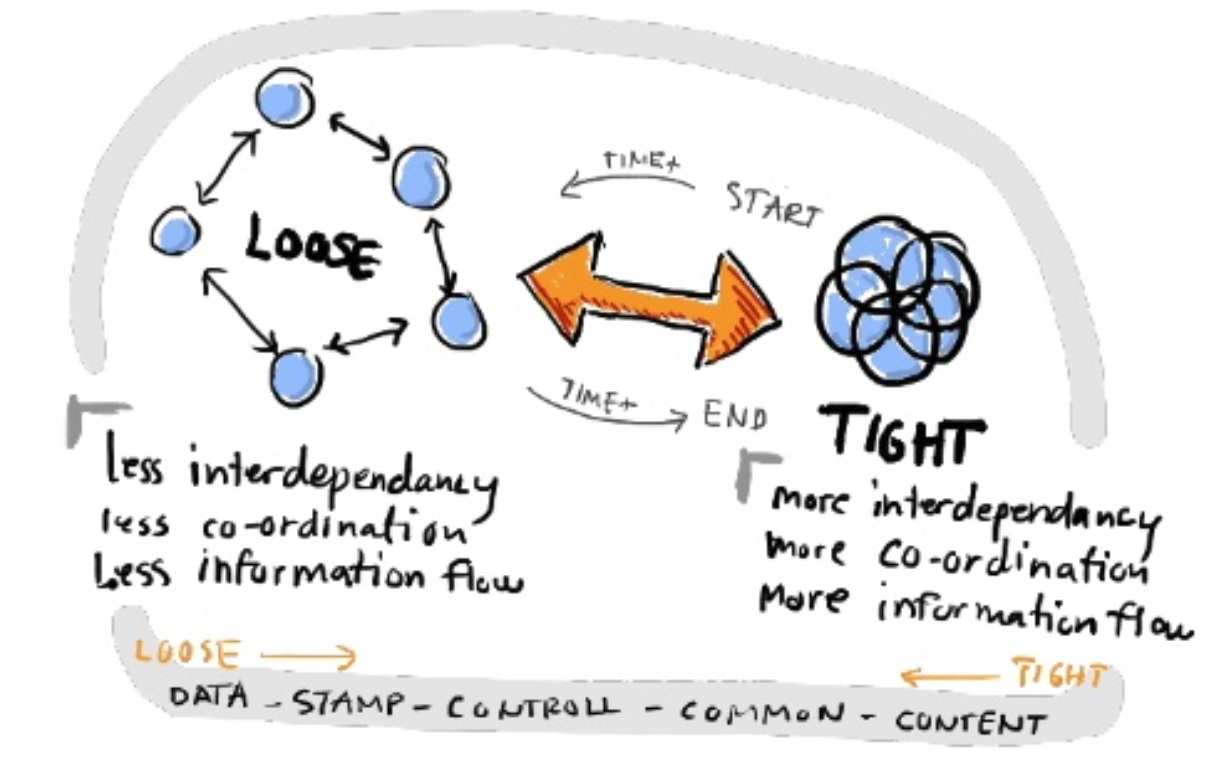
Tight Coupling vs. Loose Coupling – the two fundamental integration patterns
A tightly coupled integration is one that creates a dependent relationship between Salesforce and whatever systems it communicates with. This means that any change to one system will likely require changes to the other.
Tight Coupling
With the Salesforce SOAP and REST API, you can perform simple CRUD operations with data that operates synchronously with the client-server pattern between Salesforce and an external system. This pattern is called Tight Coupling because the client is blocked at the API call until a response is received.
Due to the decomposed design of having separate functional units in modern software design, such tight coupling can cause issues. The following illustration shows the challenges:
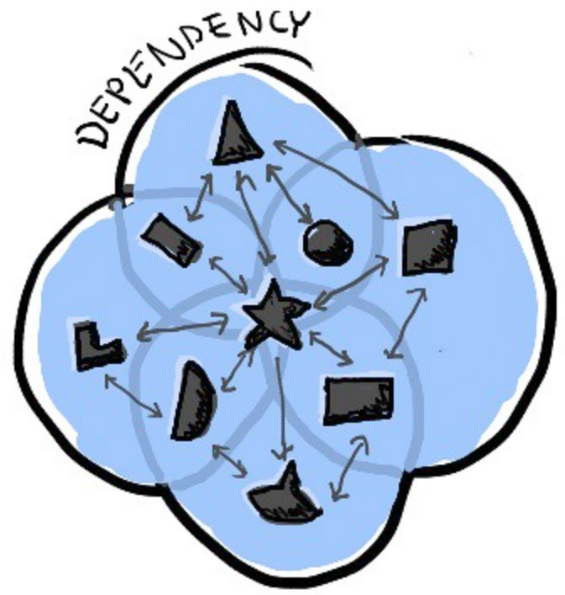
Challenges of Tight Coupling
Here are some considerations when planning to use the synchronous and tight coupling architecture for your integration:
- Tight coupling model provides more interdependency on both integration systems.
- It requires more coordination between two systems while both are equally co-ordinating with each other.
- The caller needs to wait until the API is finished, which results in blocking of the sender.
- This waiting for API callouts results in bad user experience and bad performance for the client.
- The client cannot use all its resources due to waiting and idle time, which results in frustration.
- This API always follows a Ping-Pong pattern to synchronize between caller and provider.
On the other side, using tight coupling is also a valid way to do integration when your business cases need real-time interaction and immediate response.
Loose Coupling
Nowadays applications are breaking from their monolithic structure into small, smart and maintainable units that communicate with each other through messages. The following picture shows the asynchronous communication model that forms the basis of loose coupling:
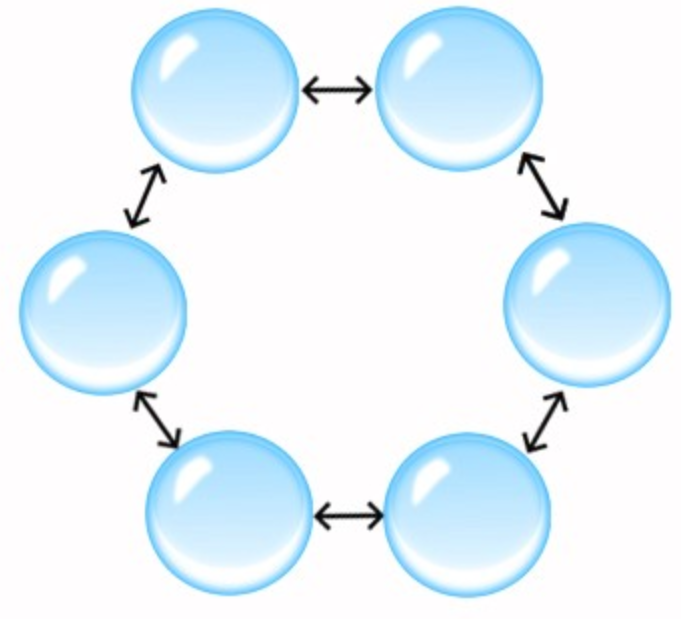
Lose Kopplung – asynchrones Kommunikationsmuster
Loose coupling follows the principle of the asynchronous communication pattern. Imagine calling somebody by phone where the other person is busy. Instead of waiting for them to answer, you leave a message on the answering machine. The other party then calls back when it suits them. Loose coupling solves the disadvantages you have with the tight coupling pattern. It doesn't need a bound on transaction time or waiting periods.
There are many great books and resources available on the internet which you can read to more precisely understand the design principle of loose coupling. For the purpose of this blog, I want to focus on the pragmatic part of integration challenges.
Integration using the API only approach
Now that we have seen and understood the two existing approaches and patterns for integration, let's take a deeper look at the pure API integration approach and its limitations.
The picture below shows the view when doing integration using the synchronous pattern with the Salesforce standard SOAP/REST API:
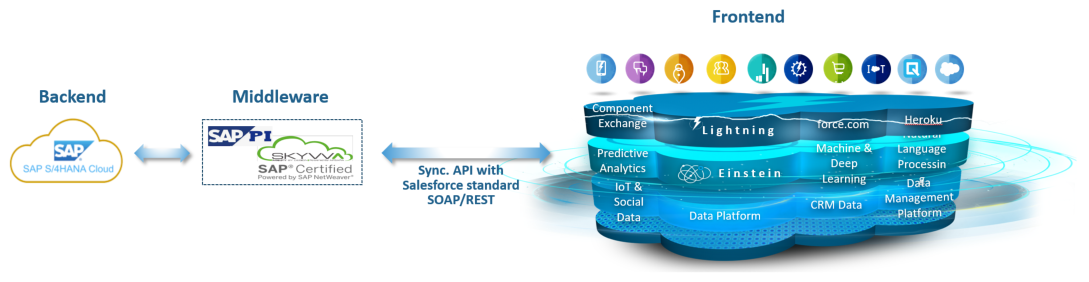
Integration architecture with a pure API approach
It shows the use case with an SAP cloud ERP application as a client which uses the API to synchronize data like Account, Contact, Opportunities, Quotes, and Orders.
The characteristic of using the Salesforce standard API is that it operates synchronously, meaning that the client application waits and gets blocked until the API call is completed:
Synchrones, blockierendes API-Aufrufmuster
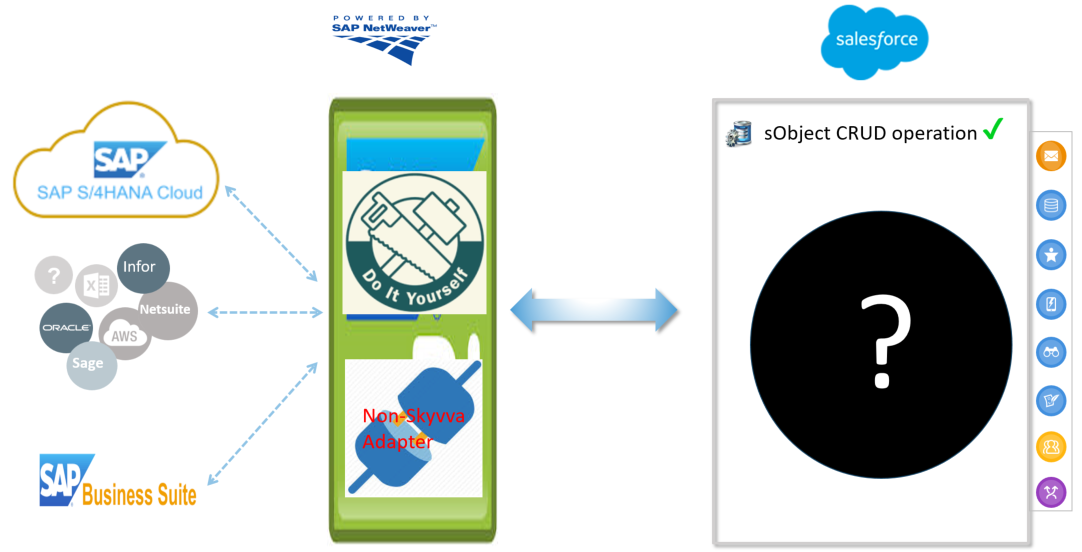
Another aspect of using the Salesforce standard API is that it provides very simple CRUD operation capability. But in a real enterprise integration scenario, you need much more:
- Message Monitoring for end-to-end visibility across all integration processes
- Error handling and Message Reprocessing without manual developer intervention
- Real-time Alerting for critical failures
- Workflow orchestration and transformation logic
- Batch scheduling and bulk processing
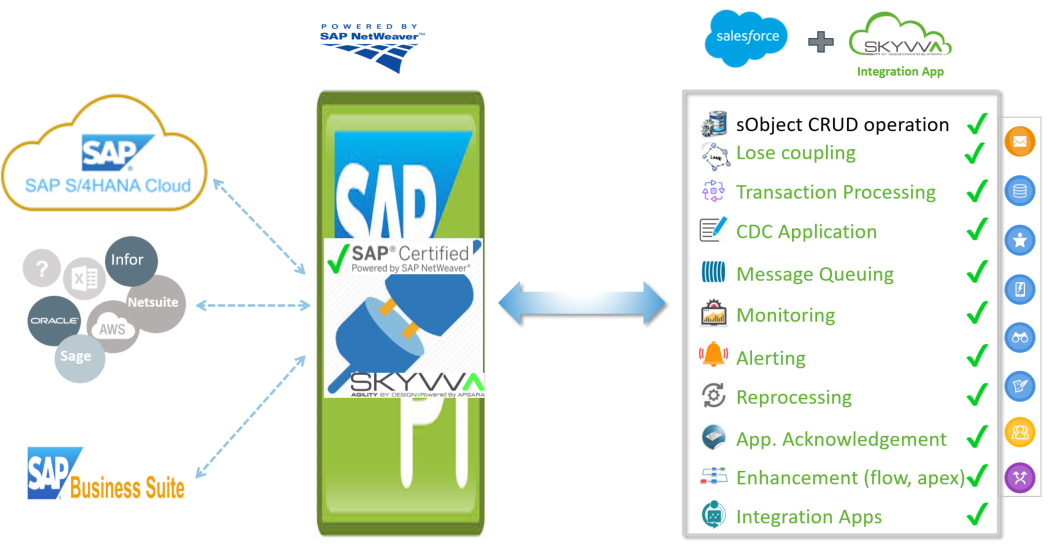
The gap between API connectivity and true enterprise integration
Looking at the picture above, you can see the filling gaps (the holes in the above picture) that a service layer needs to cover. These missing parts cannot be provided by the simple Salesforce standard API alone.
Why integration needs both patterns
As integration problems and use cases are too different, we cannot say that the tight or loose coupling will be the only approach for all situations. One approach and architecture style is not enough in solving today's integration need for the Salesforce ecosystem.
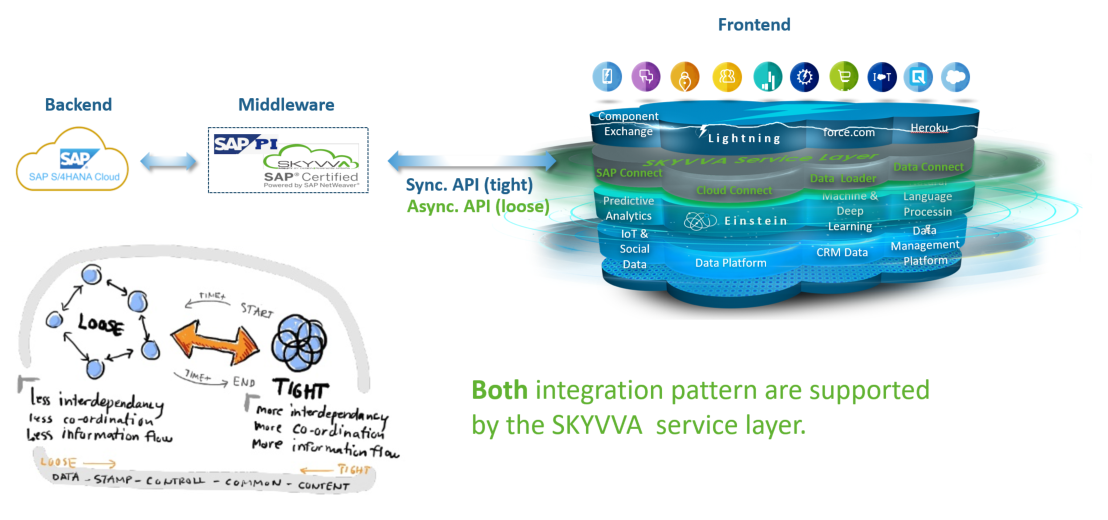
Both integration patterns are needed in an enterprise solution
When designing an enterprise-class integration scenario, you need to consider the pros and cons of both patterns. After having explained the Salesforce standard API, the two integration patterns, and the need for both patterns, it's time to show you the SKYVVA solution.
The SKYVVA added-value we want to showcase in the below chapters:
- Message Monitor – a handy tool for monitoring incoming and outgoing messages
- Message Reprocessing – allows you to correct wrong incoming data and reprocess without needing the sender app developer
- Alerting – eases your life by not requiring you to actively and permanently watch the monitor
How to monitor in case something goes wrong
Let's start with a question: does your interface and integration that you have developed always run smoothly without any issue? No! In reality, integration systems regularly face data problems that require a reaction and correction.
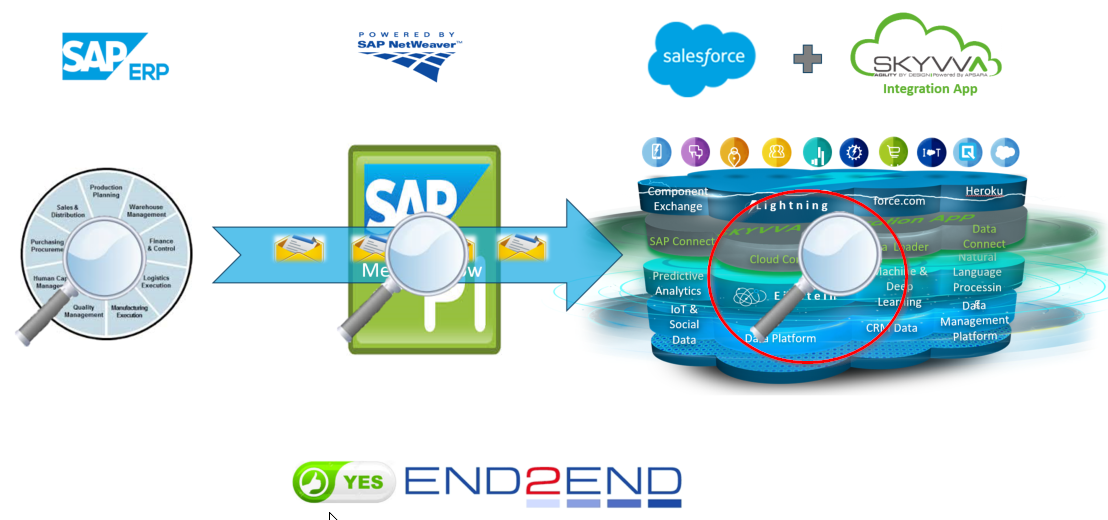
SKYVVA Message Monitor – end-to-end monitoring of all integration messages
With SKYVVA you now have end-to-end monitoring because the messages are kept for monitoring purposes in the SKYVVA service layer. This means you can see all incoming and outgoing messages in the SKYVVA Message Monitor.
The screen below shows an example of the monitoring screen where you have different options to find the messages. For example, you can filter by interface name to see only messages for a specific interface:
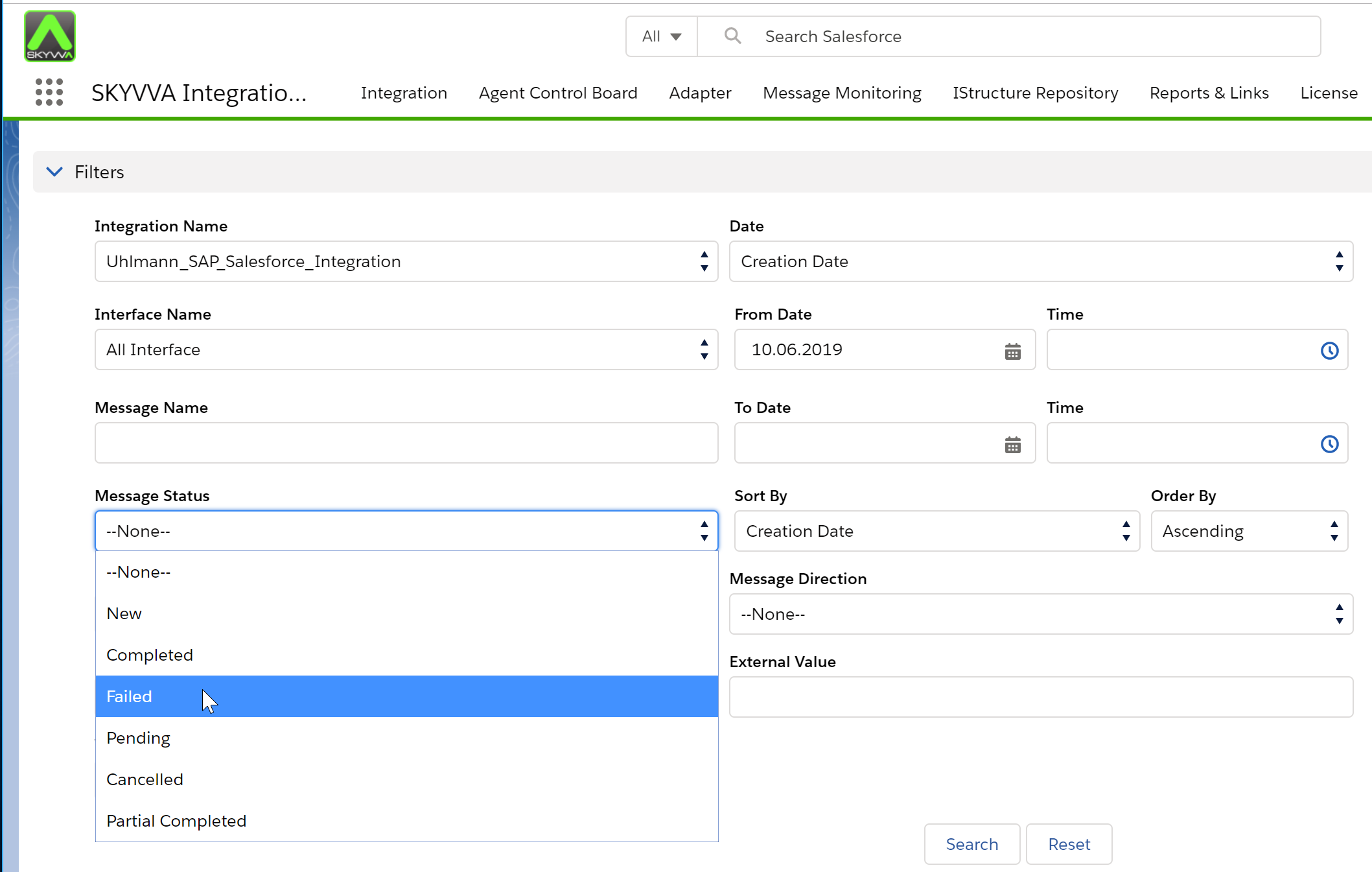
SKYVVA monitoring screen with various filter options
It provides flexibility to monitor your integration data by specific date and time as well. Hence you don't need to be actively present at all times to monitor the integration.
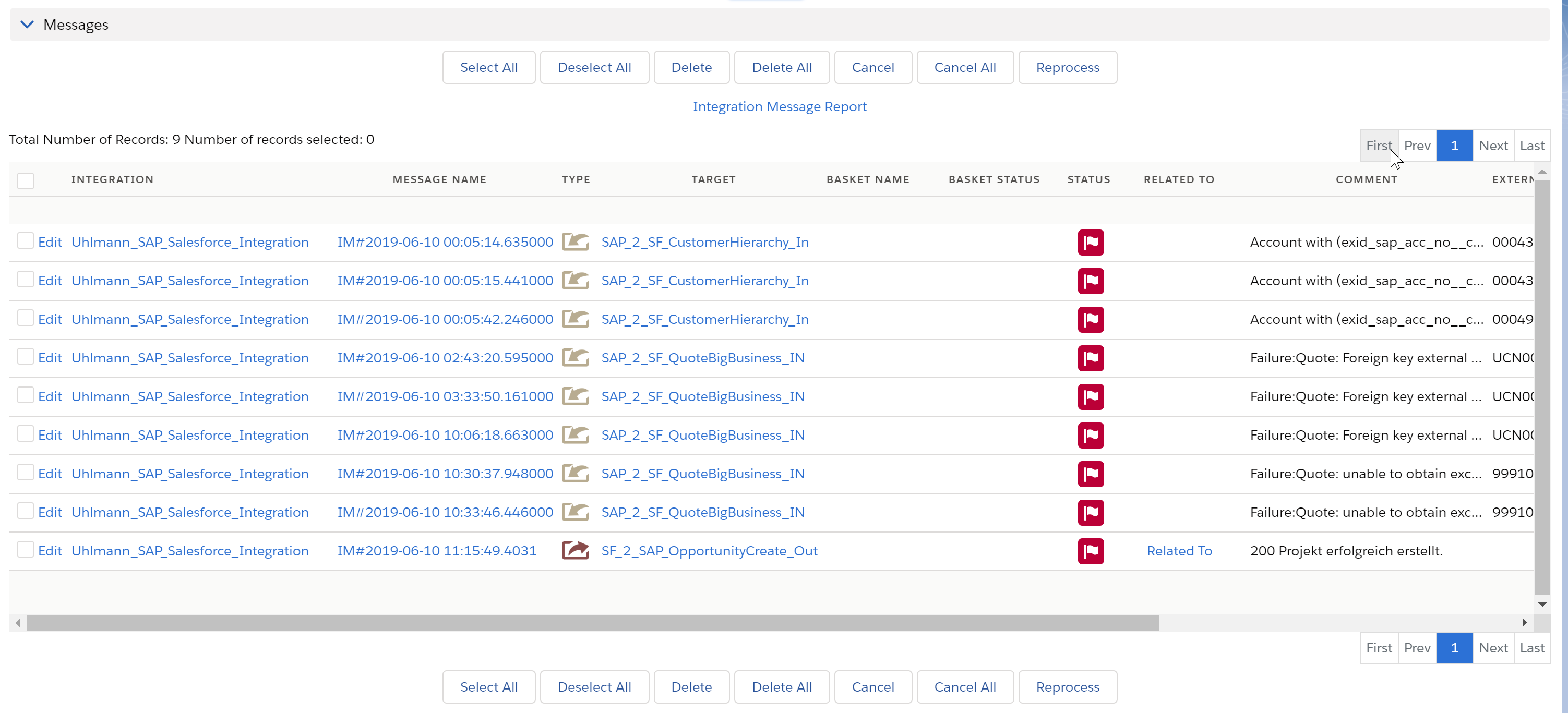
SKYVVA message status filter for detailed monitoring
Depending on the processing, different message status filter options are available:
- Completed – When the API call is successful and data is successfully posted.
- Failed – When data is posted but failed for some reason, for example due to a data type mismatch.
- Pending – When your data is sent by the sender but pending to be posted in Salesforce.
- Canceled – When data is canceled after API calls.
Easy data fixing with reprocessing
Imagine an example where you have to bring your sales quotes and orders from an ERP system such as SAP to Salesforce for your sales representatives. What happens when a data error occurs when the data arrives, for example a wrong date format?
What do you do now? You can ask your colleague to correct the data in the SAP system and resend it. What happens when your company uses integration middleware that handles data transformation? In that case you also need to ask the middleware developer to correct the transformation. Such scenarios happen in reality and you need the ability to independently perform the correction and reprocessing.
Start using the message monitor to look for failed messages, or jump directly from your email inbox where you received the alert:
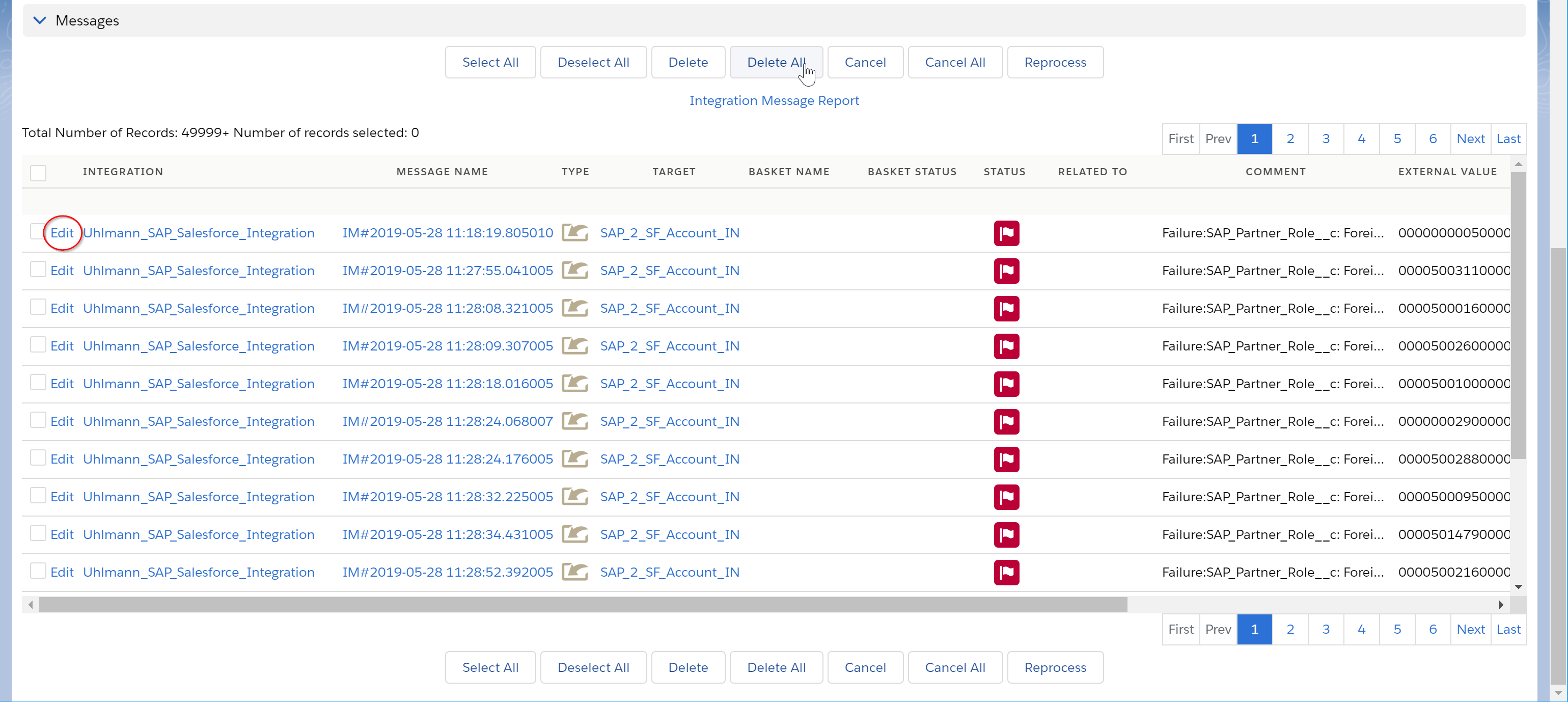
SKYVVA reprocessing feature – correct and reprocess failed messages
After identifying the failed messages, you can edit the data directly in the SKYVVA Message Monitor and reprocess without external help:
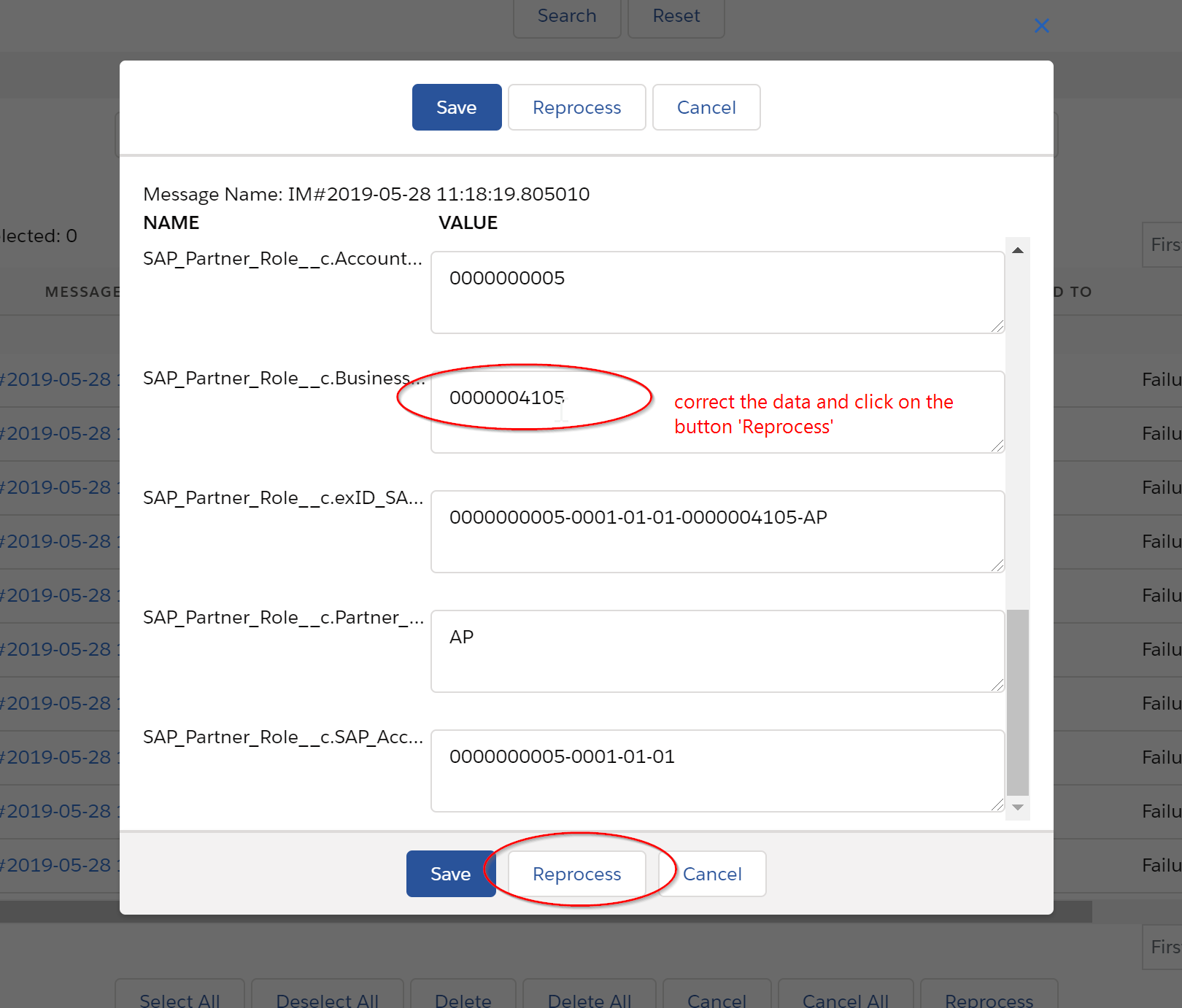
Directly edit and reprocess a message in SKYVVA
Why alerting can help you
As you have seen, having an additional component to monitor data in Salesforce is a great help for your daily operations. Monitoring allows you to actively look, search, and see the integration data failures. What if you don't have time to watch the monitor, or the problem occurs in the middle of the night?
With the Alerting feature, you can define rules that trigger a notification when certain conditions are met — for example when a certain number of messages have failed:
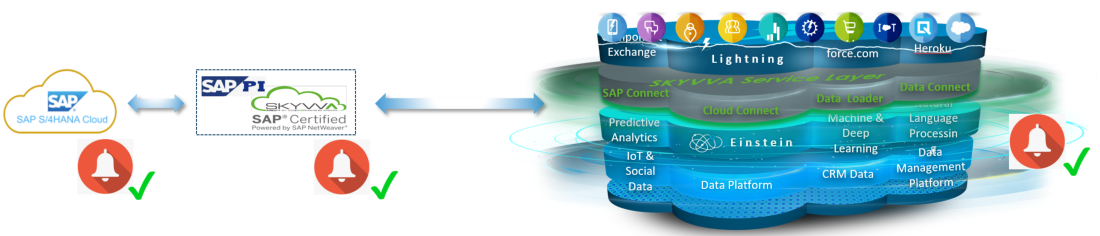
SKYVVA alerting configuration for proactive error notifications
With this feature, the SKYVVA solution has added the missing part to the Salesforce platform regarding alerting functionality. You will now be proactively informed about problems without having to actively search for them.
Summary
You have reached the end of this comprehensive blog. There are some more functionality and added value in SKYVVA which I will cover in future blogs.
As you have seen, it is not the matter or question of whether you can do integration with the existing Salesforce standard APIs. The question is whether the standard Salesforce API is sufficient to fulfil all that a real, robust, enterprise-class integration requires. What about the error handling including the alerting functionality you need for a truly robust integration? Do you have all of what it takes for an enterprise-class integration?
Find the latest release version here and make the first try with the free Proof of Concept.
Ready for a native Salesforce integration?
Discover how SKYVVA connects your system landscape with Salesforce — no middleware, no compromises.
Request Demo →