Salesforce is your digital front-tier core for customer success. You integrate ERP systems such as SAP, webshops such as Amazon or eBay, payment systems such as PayPal, social media such as Facebook or LinkedIn, and legacy data pools such as databases, files, or FTP — to and from your Salesforce — to create a connected, uninterrupted customer experience using a middleware.
It works as designed. But one day you realize that some data is missing — data that was supposedly sent from the middleware. You are not sure which data actually arrived on the Salesforce side, and you ask yourself: "Where can I see the data that was sent by the middleware?" — because the middleware provides a nice monitoring feature to see data leaving the middleware, but nothing about what happened on the Salesforce side.
You have connected an HR and billing system to your Salesforce and need to keep data history for your auditing department — to prove evidence for a government security and auditing check. For such an auditing process, data on one side (the sender / middleware) is not sufficient and does not fulfill the government auditing standard. They request you to provide the other side too — i.e., data that arrived on the Salesforce side. How are you going to provide such logging and tracing of historical data on the Salesforce side?
Since you use a middleware, you have a nice alerting feature for when a message fails while being sent to Salesforce. But one day you realize that some alerts contain strange technical error text such as:
"java.lang.StringIndexOutOfBoundsException: String index out of range: -1
at java.lang.AbstractStringBuilder.substring(AbstractStringBuilder.java:868)"
But you would expect a clear business error telling you something like: "Quote XX cannot be posted due to invalid sales area code." Which of the two error texts would you prefer to see?
Such situations can and will happen one day with your Salesforce integration. When they do — are you going to keep asking the same questions, or are you going to provide a real solution? Read on to see the answer.
How Middleware Integration Works
Let's understand how Salesforce integration via middleware actually works. To connect to Salesforce, the middleware provides a technical connector that invokes and consumes the SOAP or REST API of the Salesforce standard API. It uses the request/response pattern — each call waits until the operation on the Salesforce side finishes. This is the nature of a synchronous API call, which follows the tight-coupling architecture pattern.
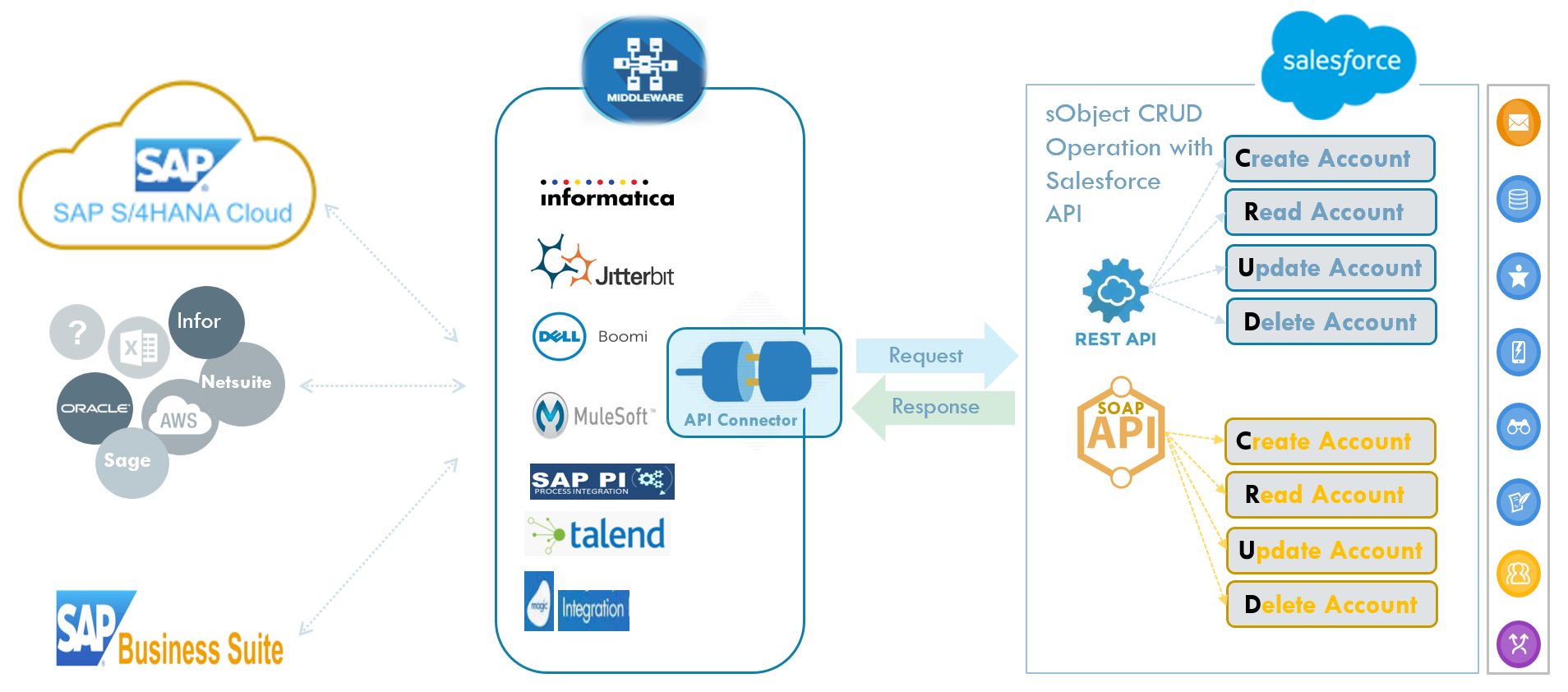
With the standard Salesforce API you can perform the basic four so-called CRUD operations — Create, Read, Update, and Delete a sObject. But beyond these four basic operations, no additional capabilities or features are available on the Salesforce side by default.
Consider this example: your integration needs to update a contact when it has changed in your ERP (e.g., SAP). But before the update, you need to check the assignment rule — that the contact has the status 'Released' and is maintained by the sales agent group 'inside sales'. After you update the contact, you want to change its status to 'Synchronized'. This means you need pre- and post-business logic alongside the integration. How can you do that with the standard API alone?
What Is Missing?
Because Salesforce — with all the apps from third-party vendors and your own apps — has become such an important digital front-tier layer for your customer success, you want enterprise-class integration that goes beyond the API-connected approach. For enterprise-class integration, you need more than just API connectivity.
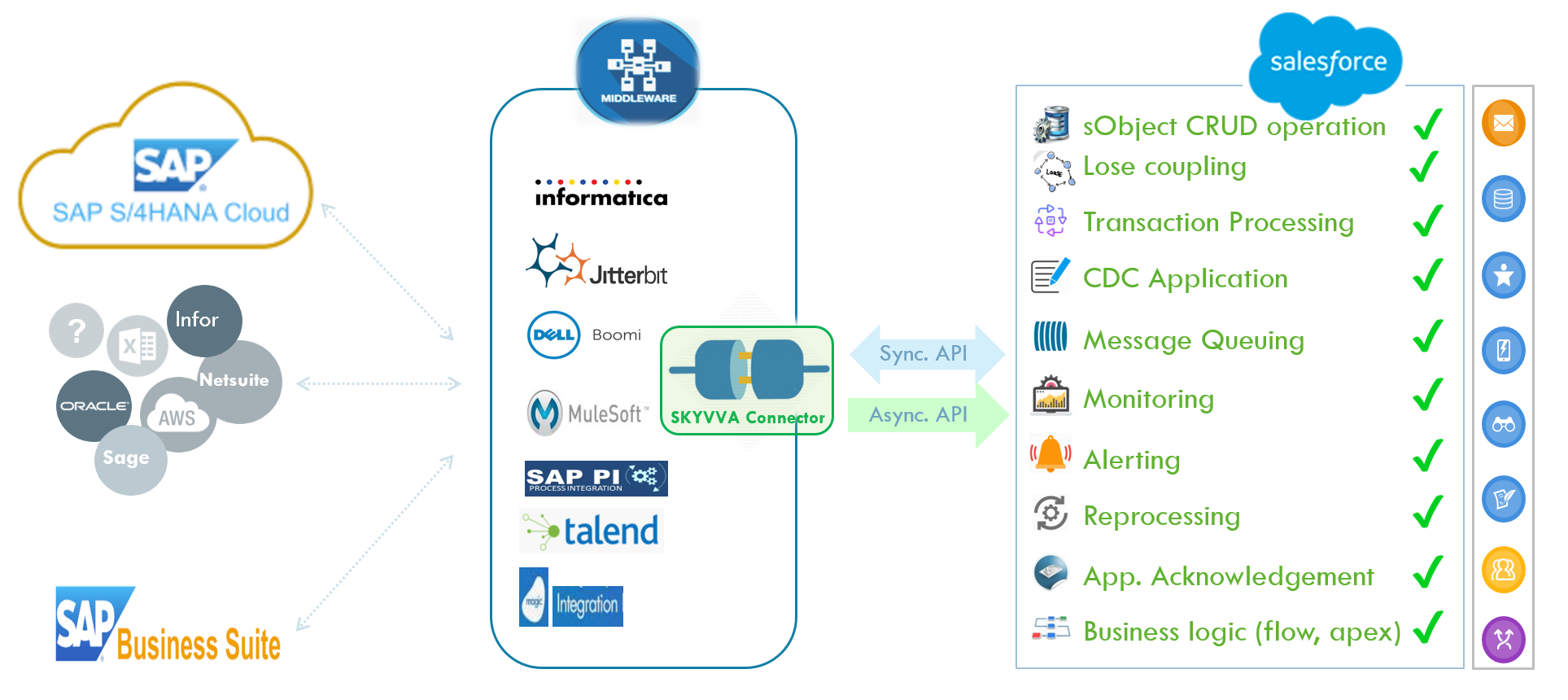
You might need to add business logic to your simple API integration. You might need monitoring, alerting, and an easy way to handle errors on your Salesforce side. You might face urgent situations where the middleware is not alive and cannot resend the message on time — in this case, it would be a great help if you could modify data on the Salesforce side and trigger a reprocessing. Furthermore, from a technical-architectural standpoint, you also need a loose-coupling pattern to handle mass data transfers, which can only be achieved using asynchronous APIs.
Why a Decoupling Services Layer Is Needed
The additional value-added services mentioned above are needed for enterprise-class integration — but they are not available on the Salesforce platform, and middleware cannot offer them. To provide such services, a decoupling layer is needed on the Salesforce platform that can stage incoming data as messages for processing at any suitable time. Since no such layer previously existed, SKYVVA created one to provide all the functionality described in the diagram below.
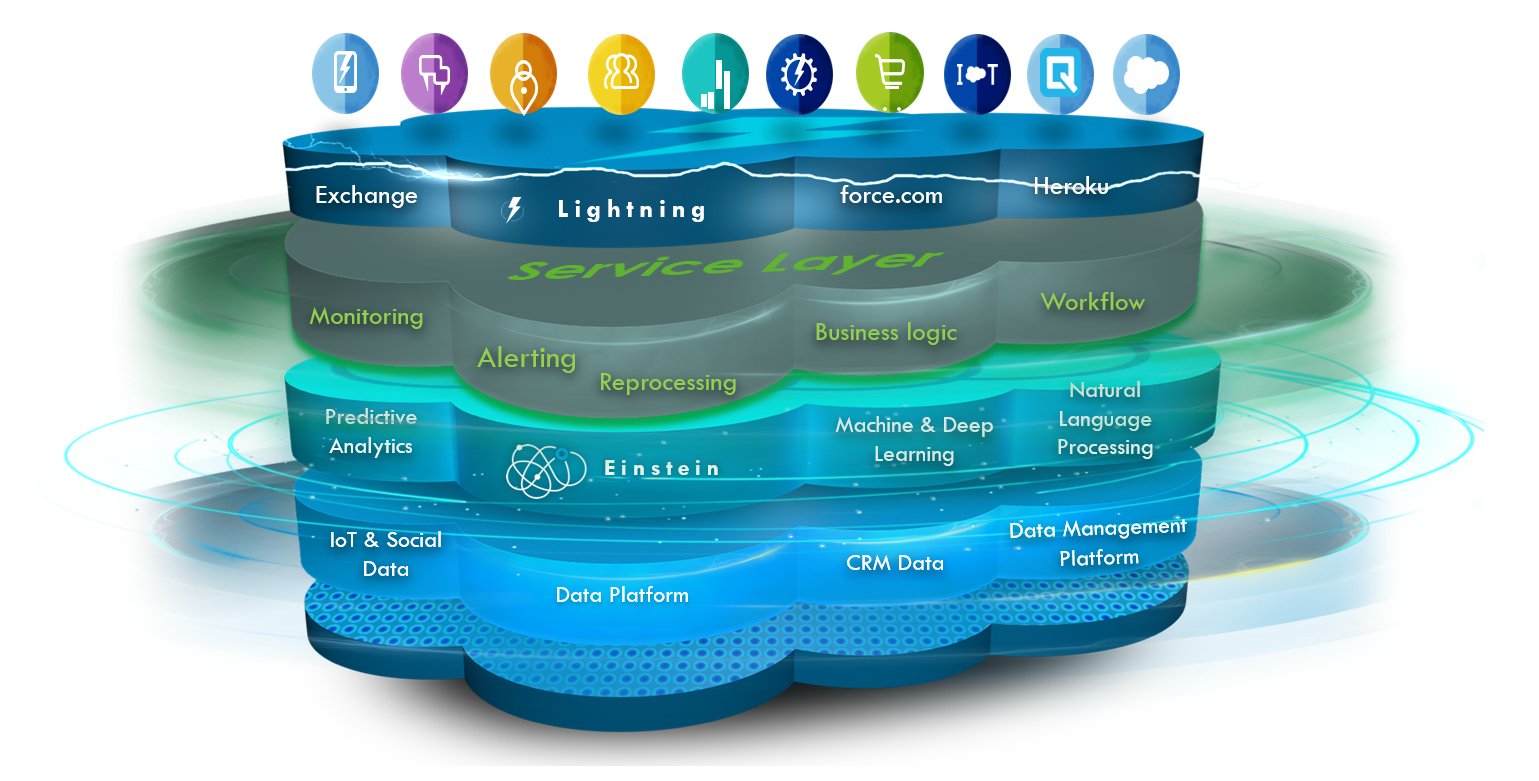
The service layer is the technical foundation for all functionality that allows API processing to be executed asynchronously. The asynchronous pattern is a crucial factor in integration architecture because it provides decoupling capability and independence of operation — it is loosely coupled. Loose coupling releases the client immediately from being blocked; the client does not wait until the invoked operation is finished.
Another key benefit is the capability to shift message processing to a later time. Imagine you have a webshop and need to update millions of product prices every day. Doing this in real-time would hit Salesforce governor limits, exhaust available threads, and degrade performance during business hours. In such a situation, it is sufficient to have the updated prices ready in the morning — you can use batch techniques to process packages of 10,000 price updates nightly starting from 10:00 pm. Without a service layer like SKYVVA provides, such a use case simply cannot be handled using only the standard API.
Additional Services You Simply Need
The following six value-added features will help simplify the maintenance and operation of your daily Salesforce integration. Of course, you could say you don't need them because everything works smoothly right now. But don't forget: the day where issues arise may come sooner than you imagine — and in that moment, you will not want to be missing these capabilities.
| #1 — Monitoring | End-to-End Visibility | A second eye on the Salesforce side. Real end-to-end monitoring with 100% view on both sides of the connected platform. |
| #2 — Reprocessing | Emergency Self-Service | Independently reprocess failed messages in case the middleware is down and cannot resend. Fix and retry directly from Salesforce. |
| #3 — Alerting | Authentic Business Alerts | Real Salesforce-side alerts with original error text — not the middleware's own internal exceptions. Sent directly and in real-time. |
| #4 — Workflow | Rule-Based Processing | Define pre-conditions and rules before data gets posted. Block wrong data before it creates inconsistency in Salesforce. |
| #5 — Business Logic | Apex, Flows & More | Link Apex classes, Process Builder, or Autolaunched Flows directly to the SKYVVA interface for powerful post-processing. |
| #6 — Batch & Scheduling | Mass Data Optimization | Shift mass-volume processing to a nightly window. Protect Salesforce performance during business hours. |
Value-Added #1 — Monitoring
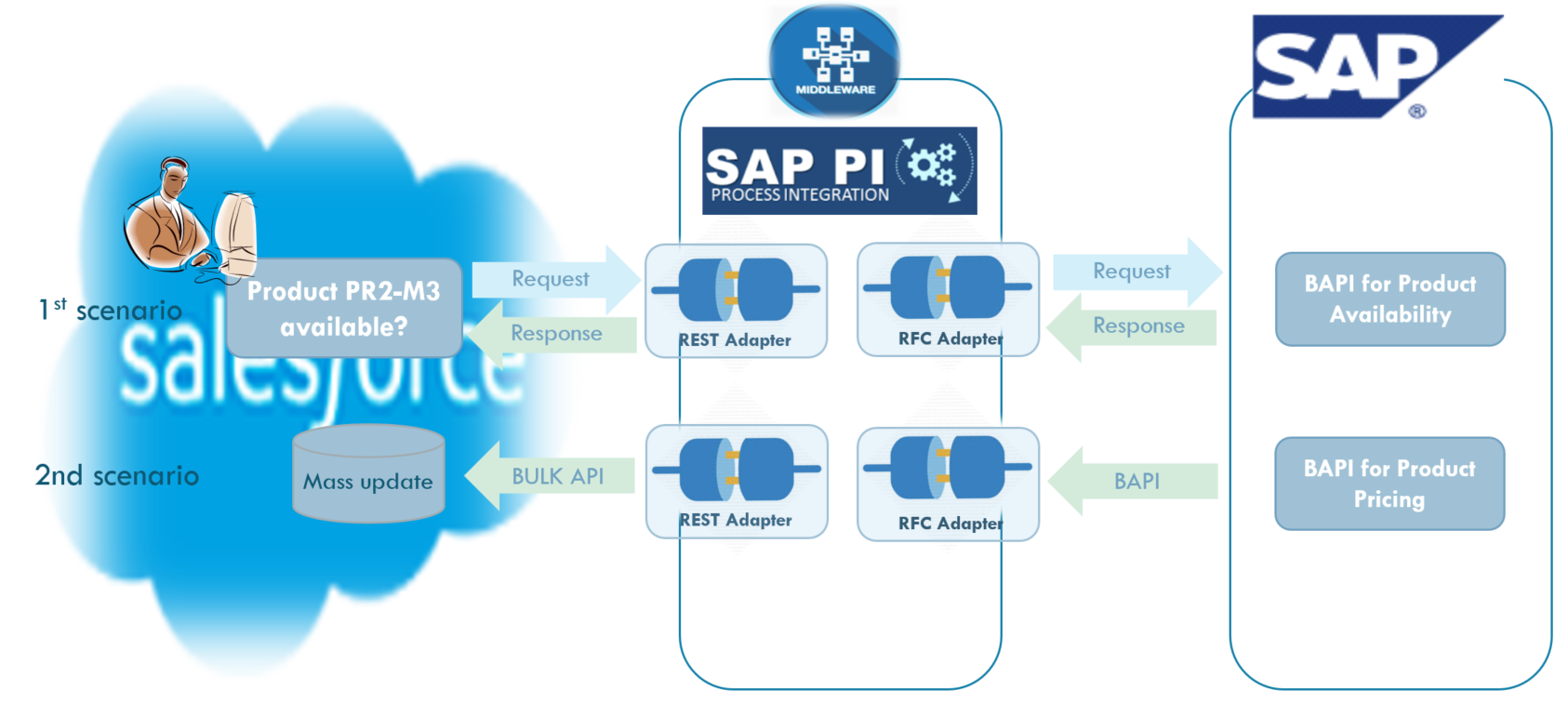
To showcase the monitoring value-added feature, consider a real interface example where the connected systems are SAP ERP (sender), SAP PI (middleware), and Salesforce (receiver). The scenario is: a customer's data changes in SAP, and the change should be synchronized immediately back to Salesforce.
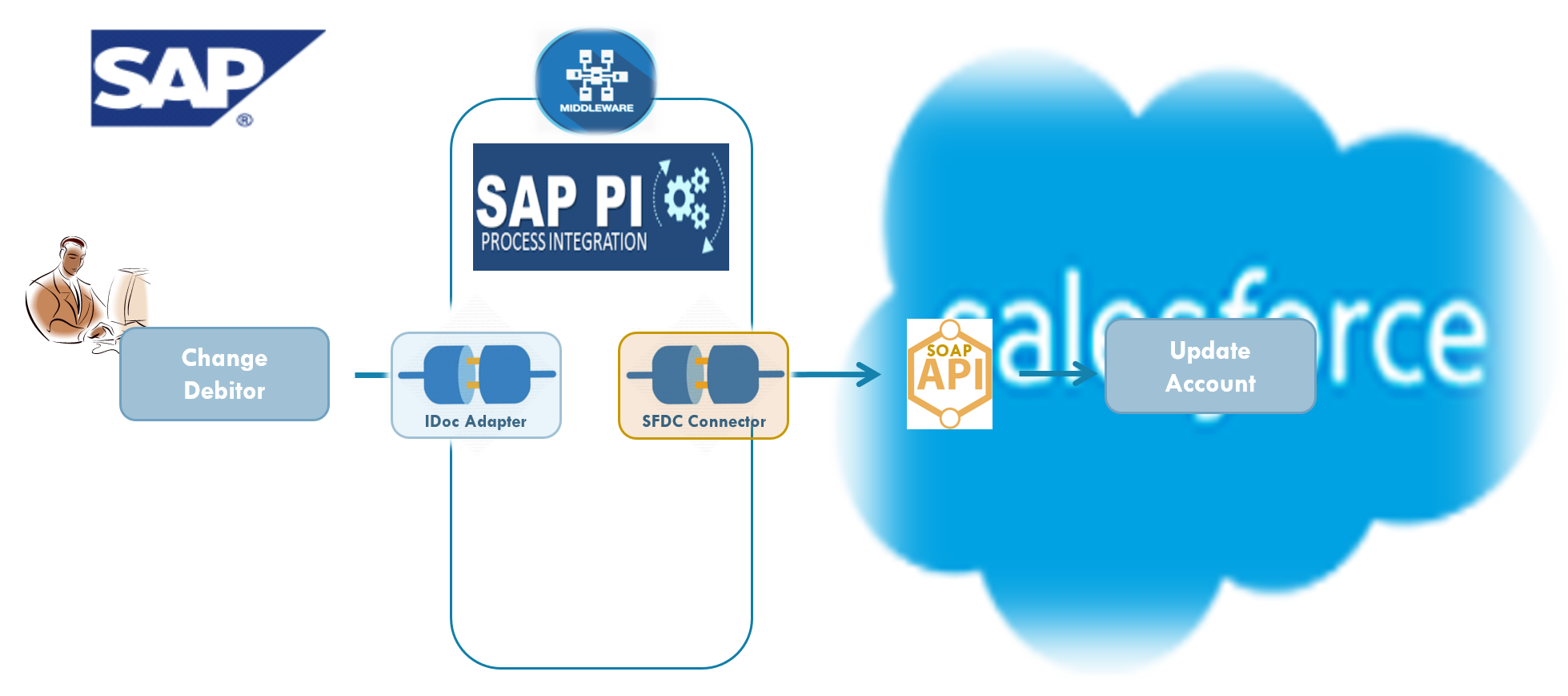
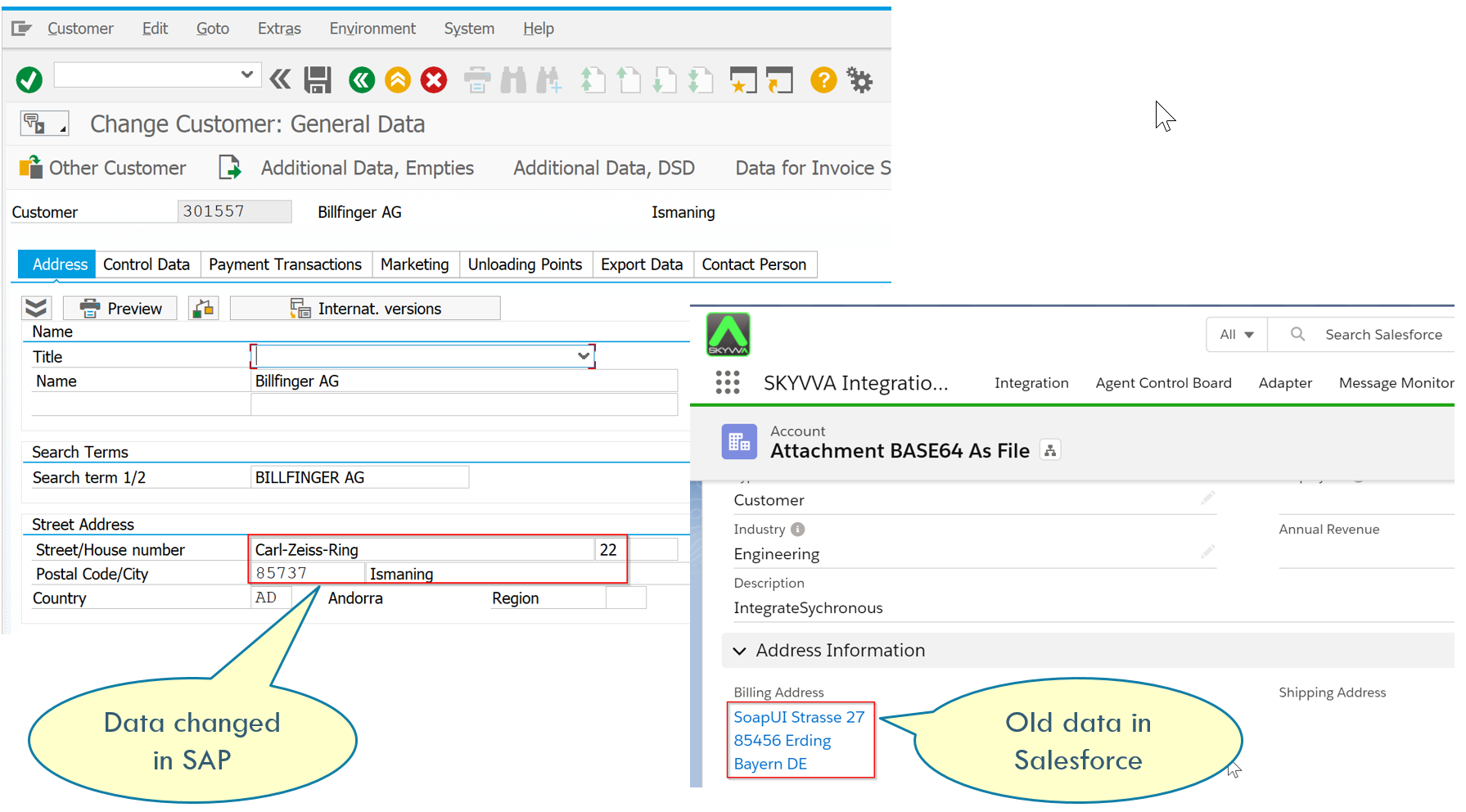
Now look at the monitoring within the connected systems. With the standard API approach, you can see monitoring on SAP ERP and SAP PI — but on the Salesforce side there is no monitoring capability. The data appears to have been sent successfully (green flag on SAP PI), yet the Salesforce record is not updated. What happened?
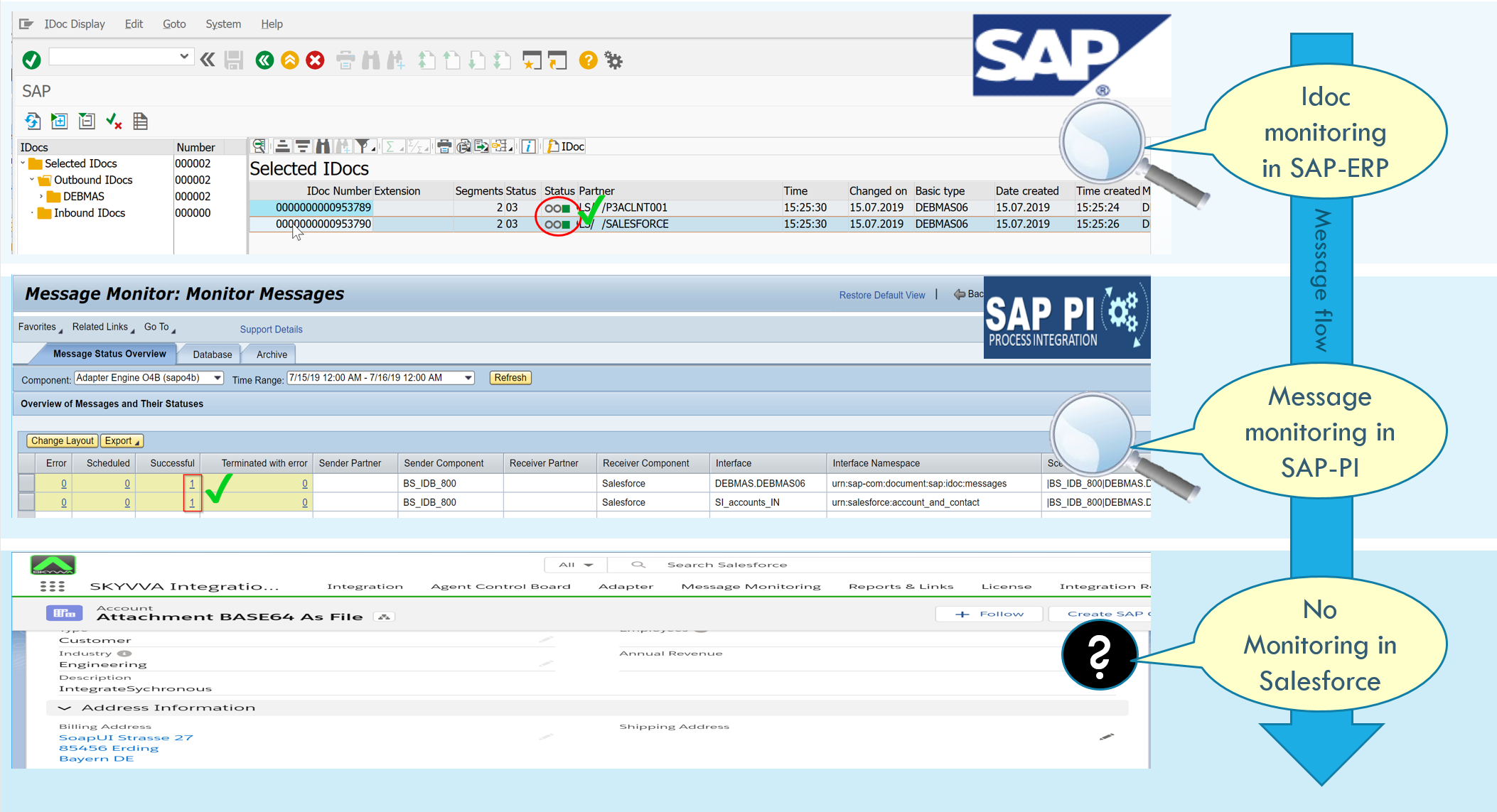
Without a native monitoring layer, you have no easy way to find the root cause. You'd need to bring in your skilled Apex developer team to investigate — wasting hours on a problem that a proper monitoring dashboard could surface in minutes.
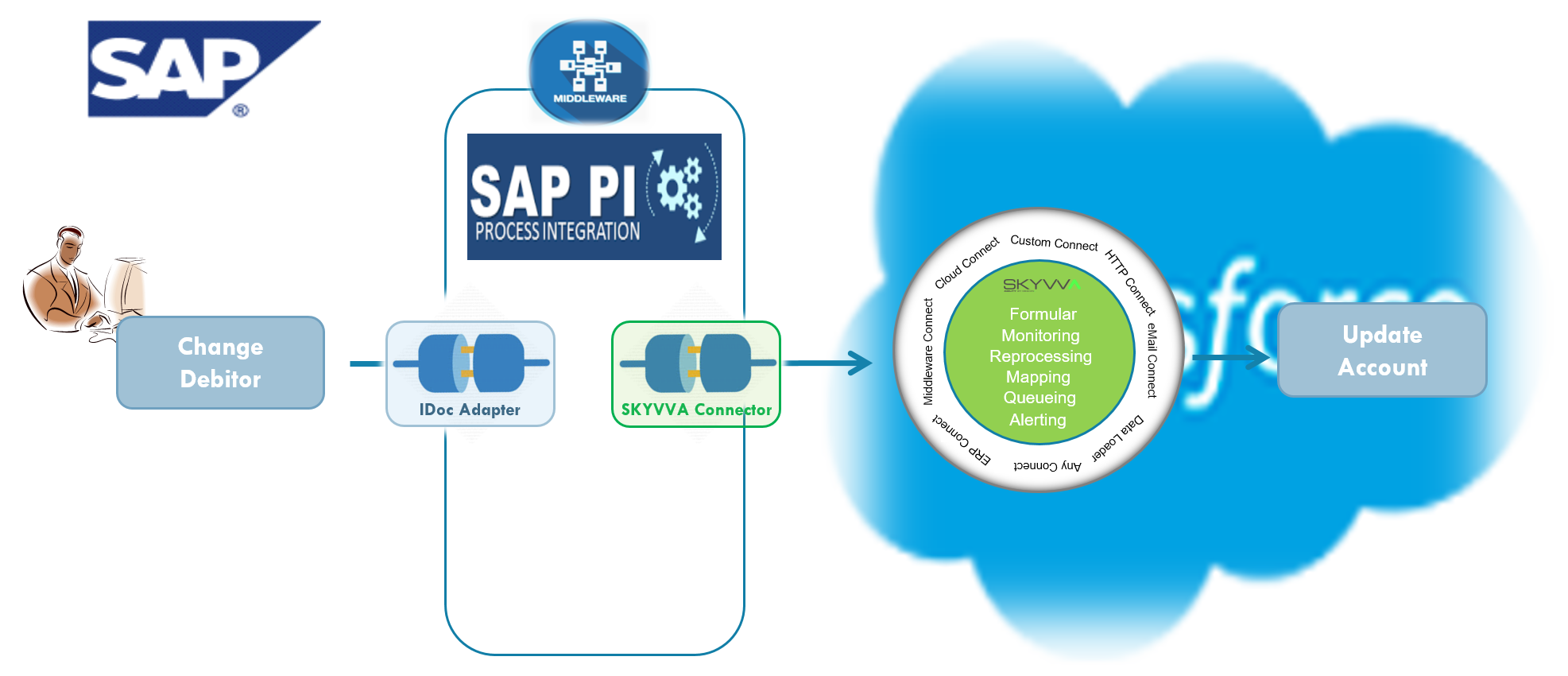
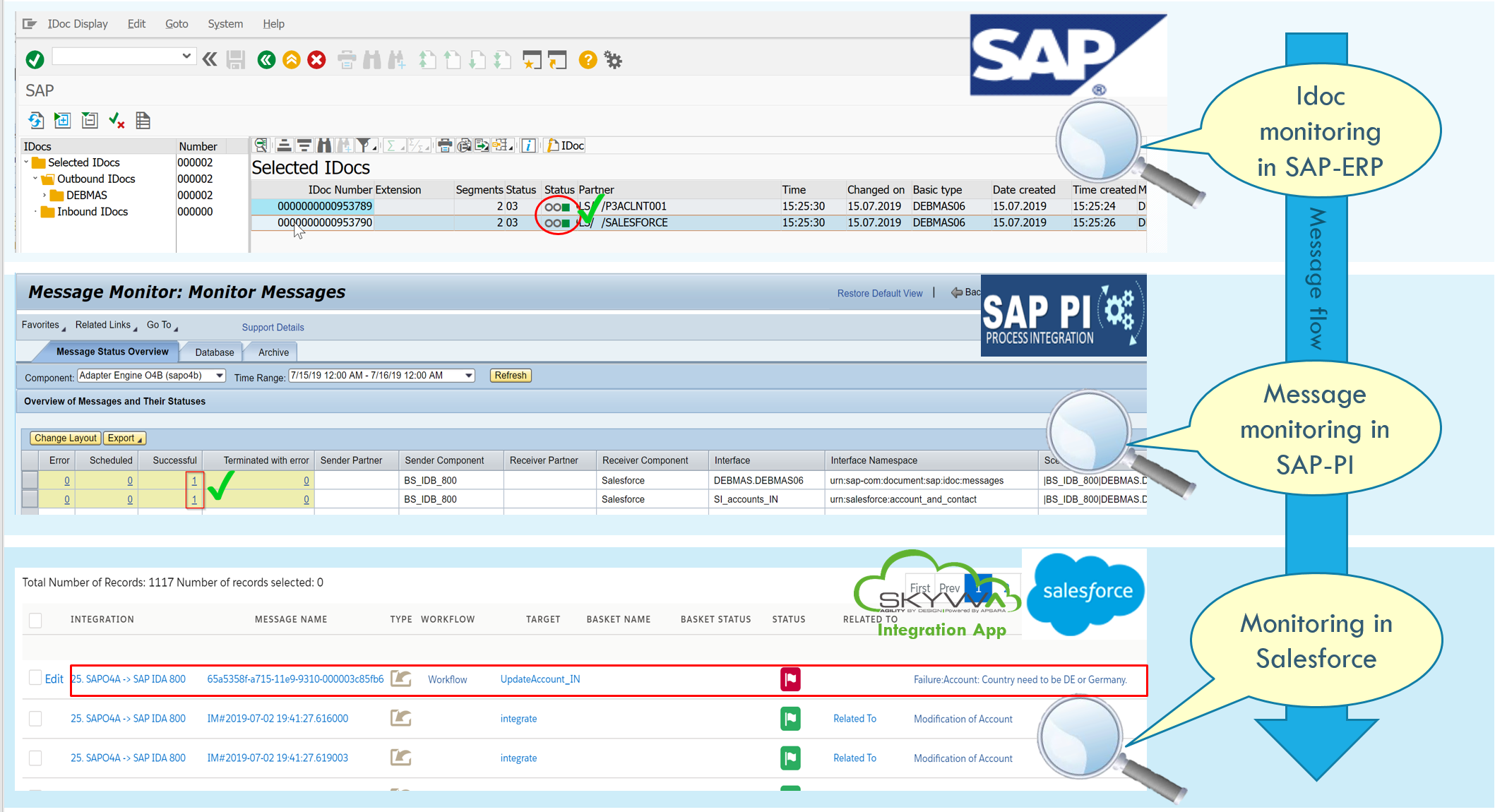
Now let's look at the same scenario rebuilt with SKYVVA. You use the SKYVVA connector on the SAP PI side and the SKYVVA service layer on the Salesforce side:
Value-Added #2 — Reprocessing
Let's stay with the example above. You see the red message in SKYVVA monitoring. You understand the business error and need to get the address updated today — because you have to send a quote to that customer before end of business day. You call your SAP ERP colleague to resend the message, but they've already left the office. The resend will happen tomorrow morning — too late for your emergency. What can you do?
With SKYVVA, simply use the reprocessing feature. Open the message, correct the data, save it, and click Reprocess:
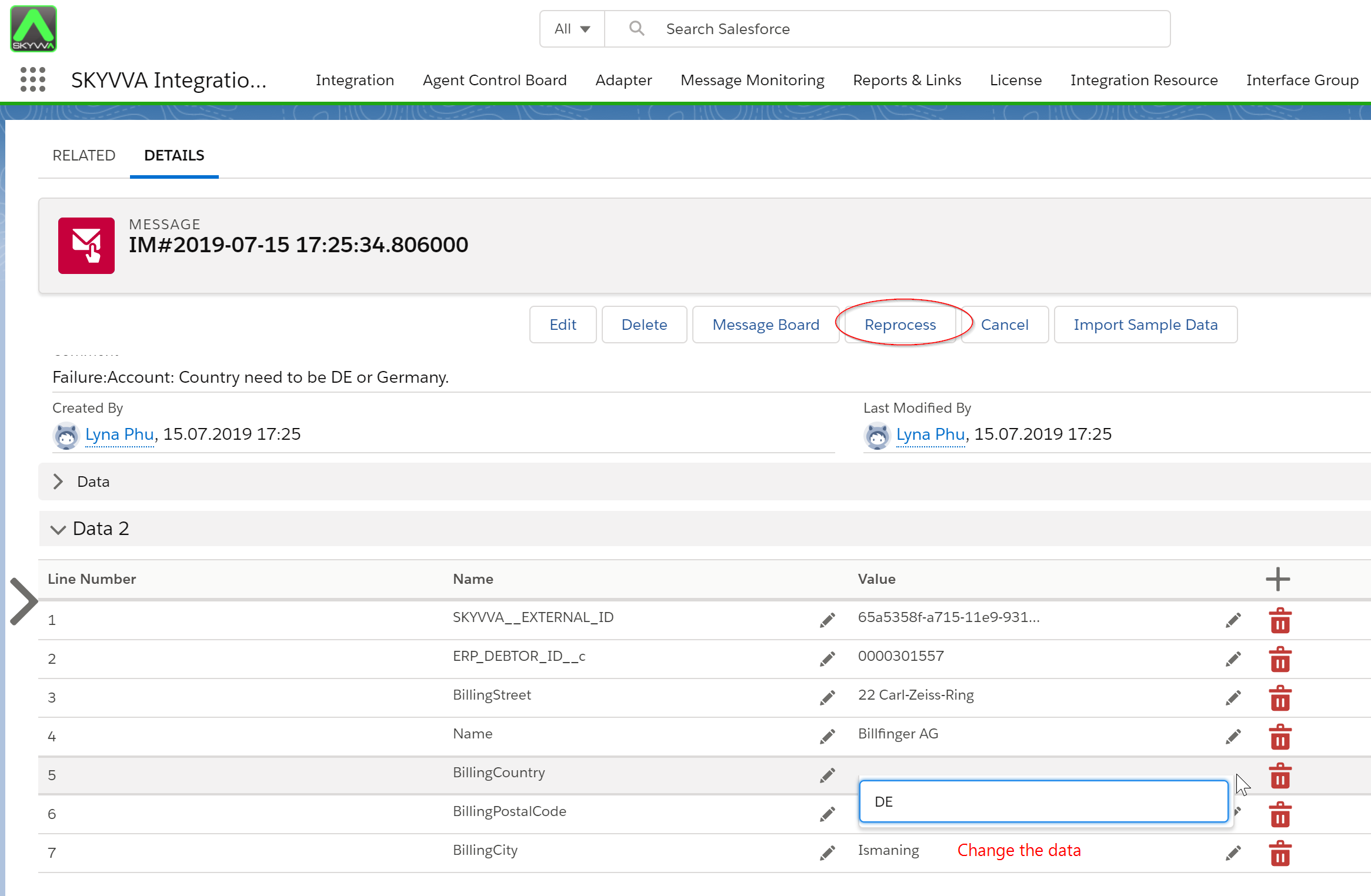
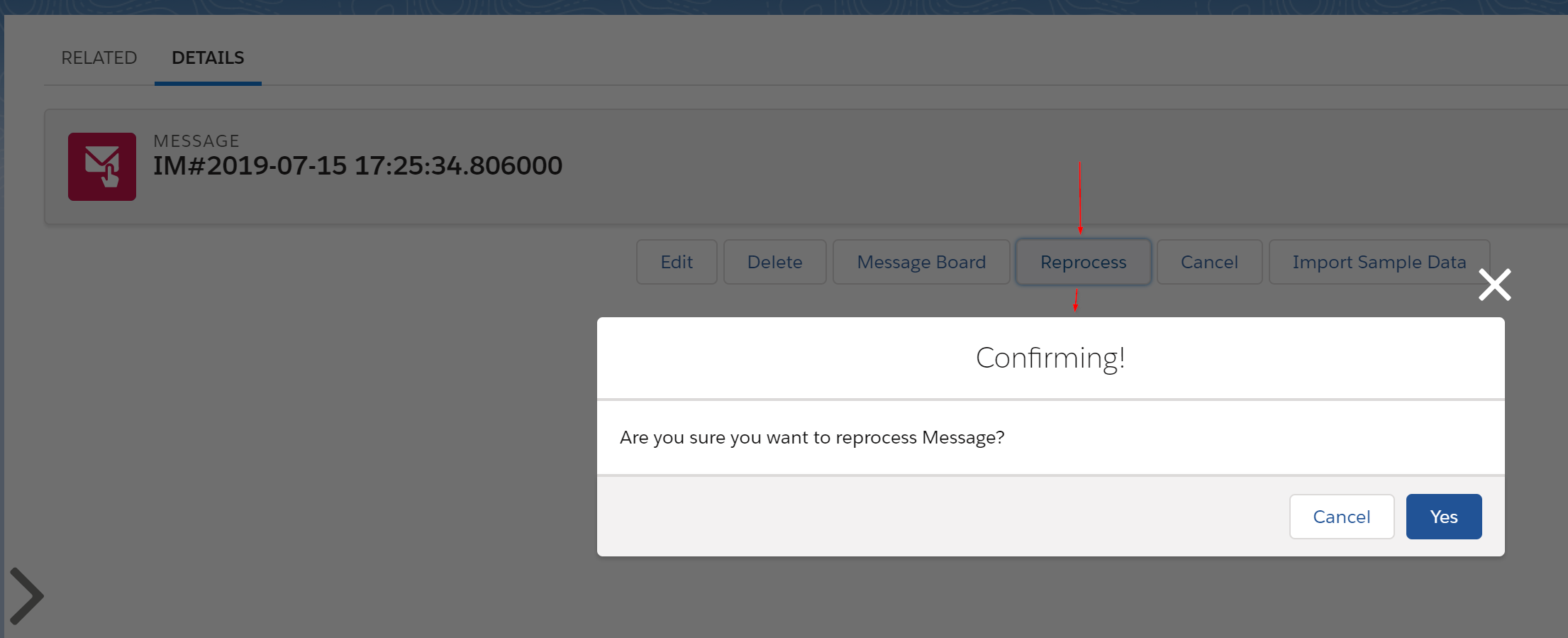
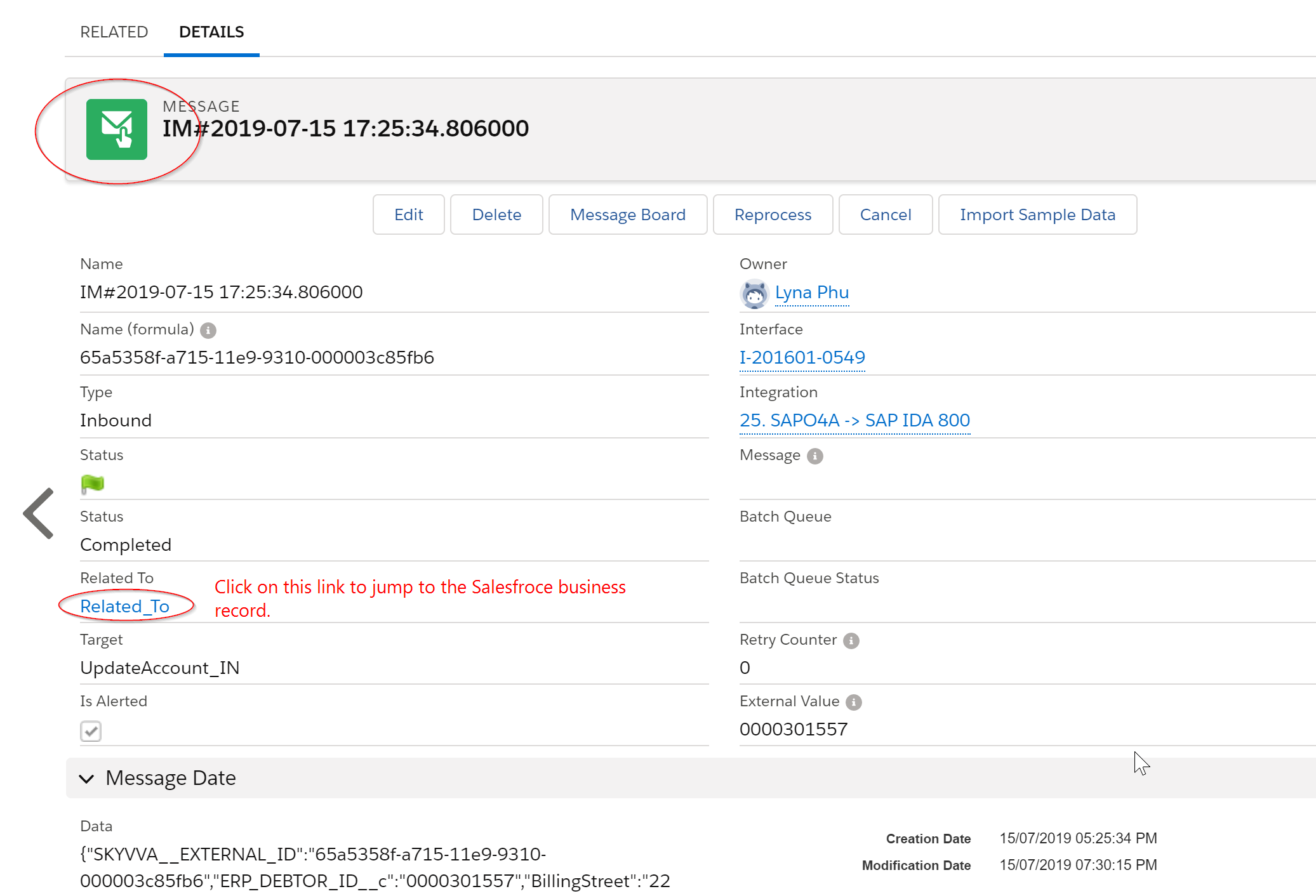
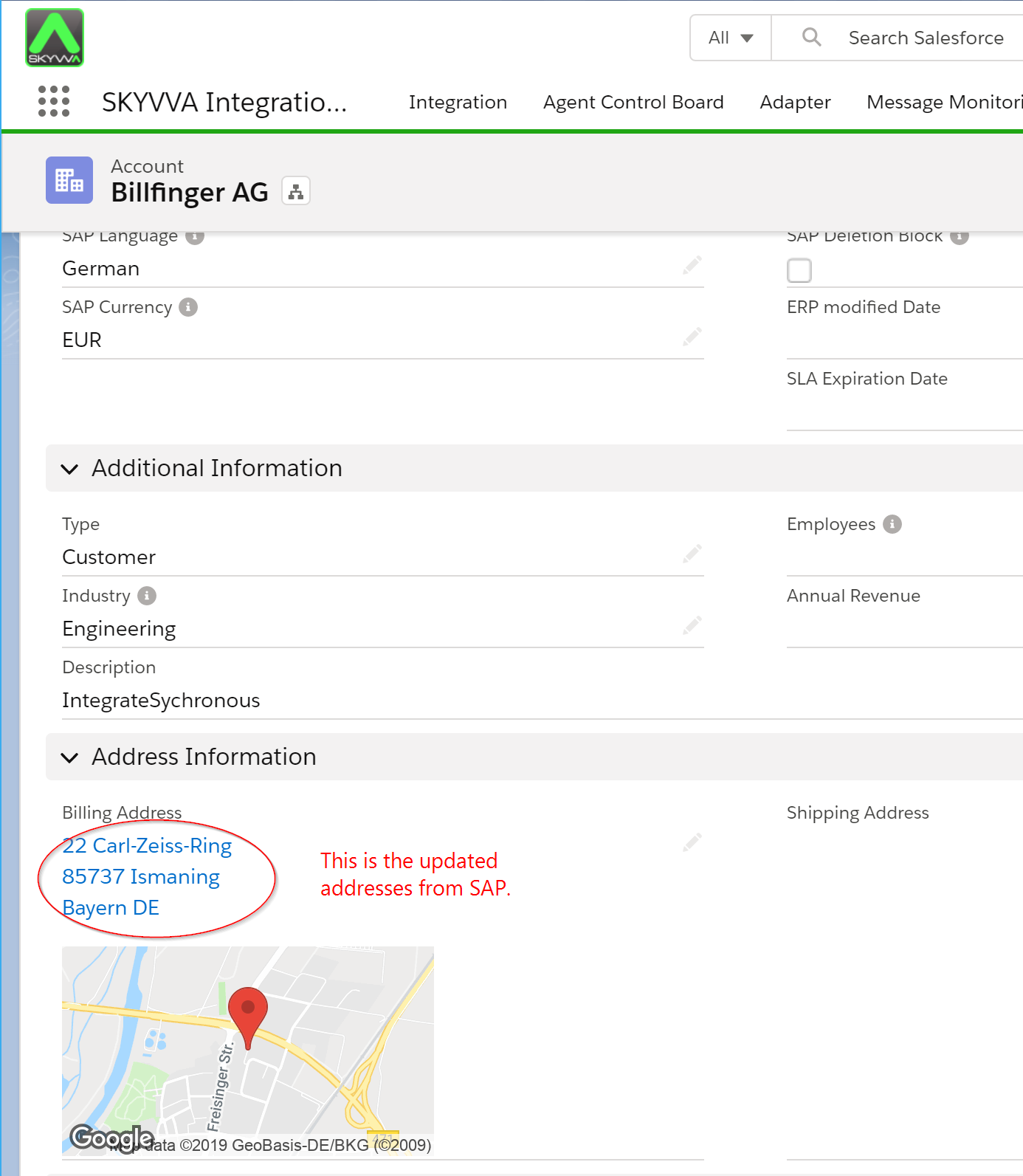
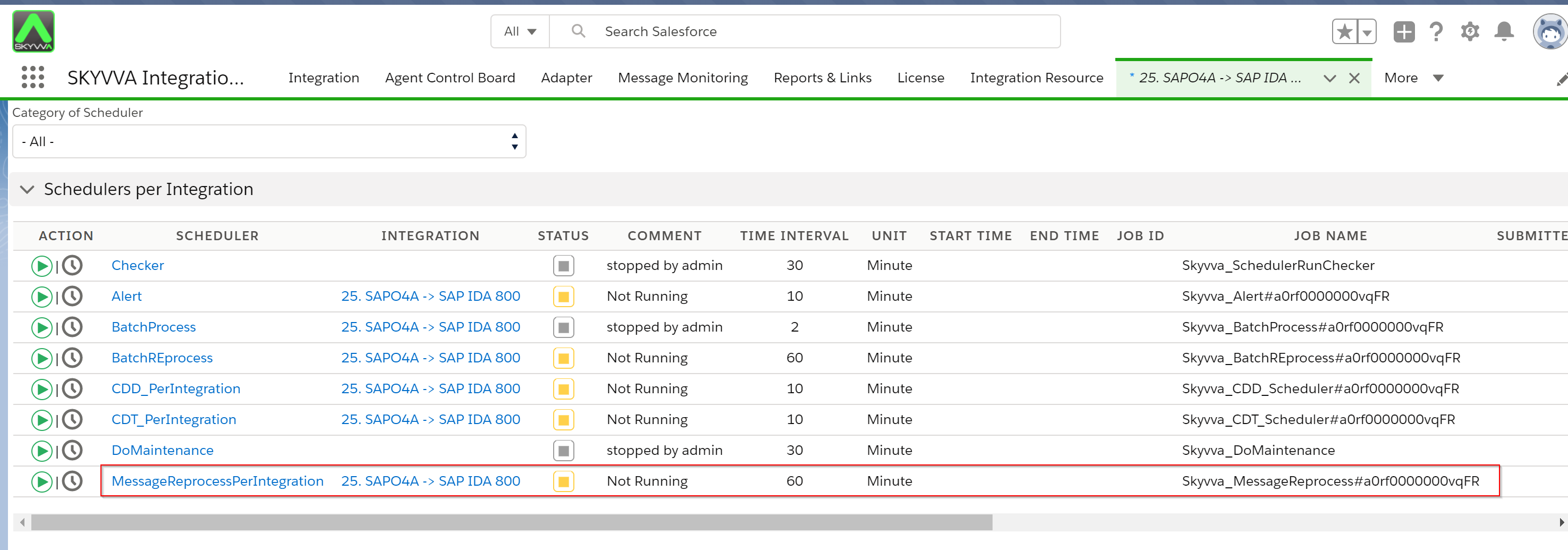
There is also a scheduled automatic reprocessing job for errors that don't require manual data correction — for example, transient errors that simply need a retry:
Value-Added #3 — Alerting
Monitoring is great, but it requires you to actively check it. Wouldn't it be better to receive an alert by email the moment something fails?
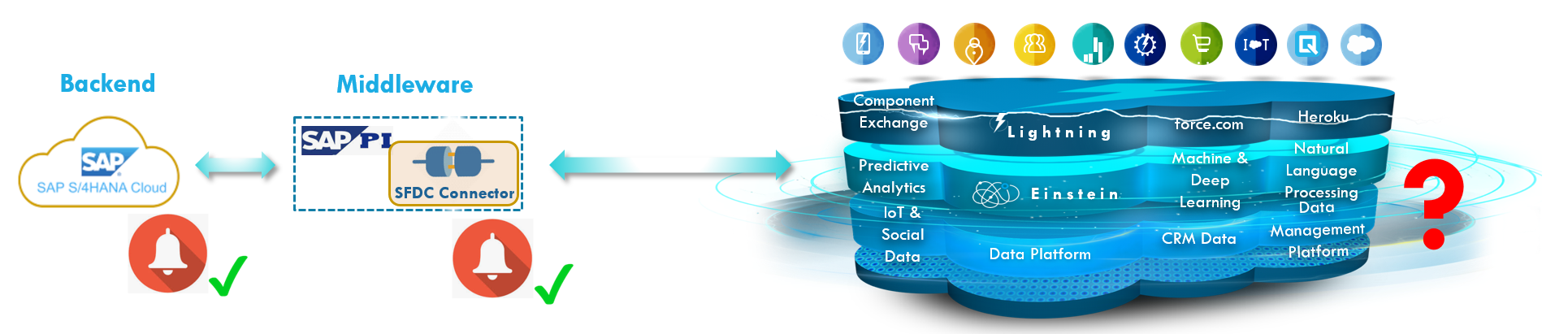
SAP ERP has alerting, SAP PI has alerting — but on Salesforce there is no alert from the standard API. The problem with relying solely on middleware alerting is that the middleware may alert its own internal errors — not the real error that happened on Salesforce. For example:
"java.lang.StringIndexOutOfBoundsException: String index out of range: -1"
This has nothing to do with the actual root cause on Salesforce. Middleware-based alerts are:
- Inaccurate — sometimes simply the wrong alert
- Not real-time enough — if the middleware is stuck or its performance is degraded
- Indirect — forwarded through the middleware rather than sent directly from Salesforce
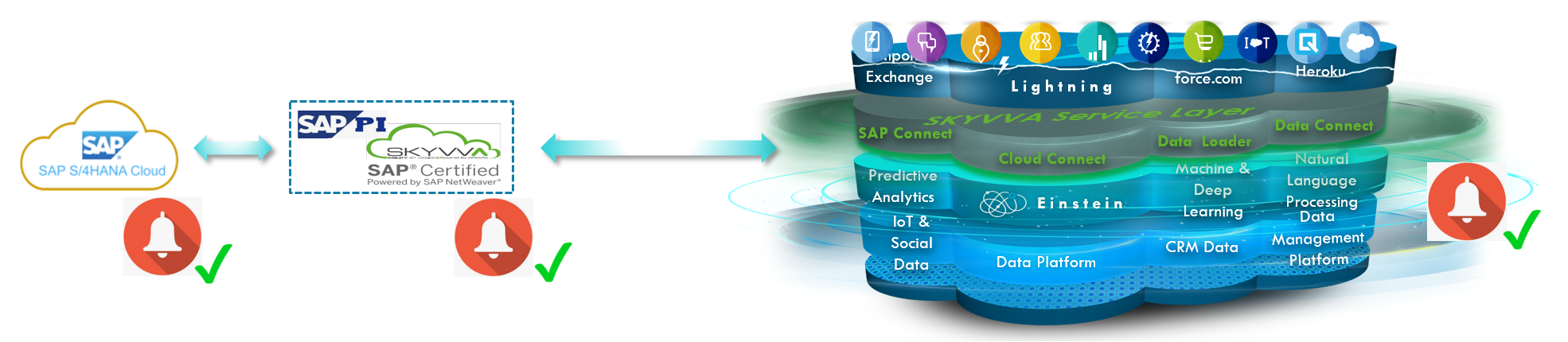
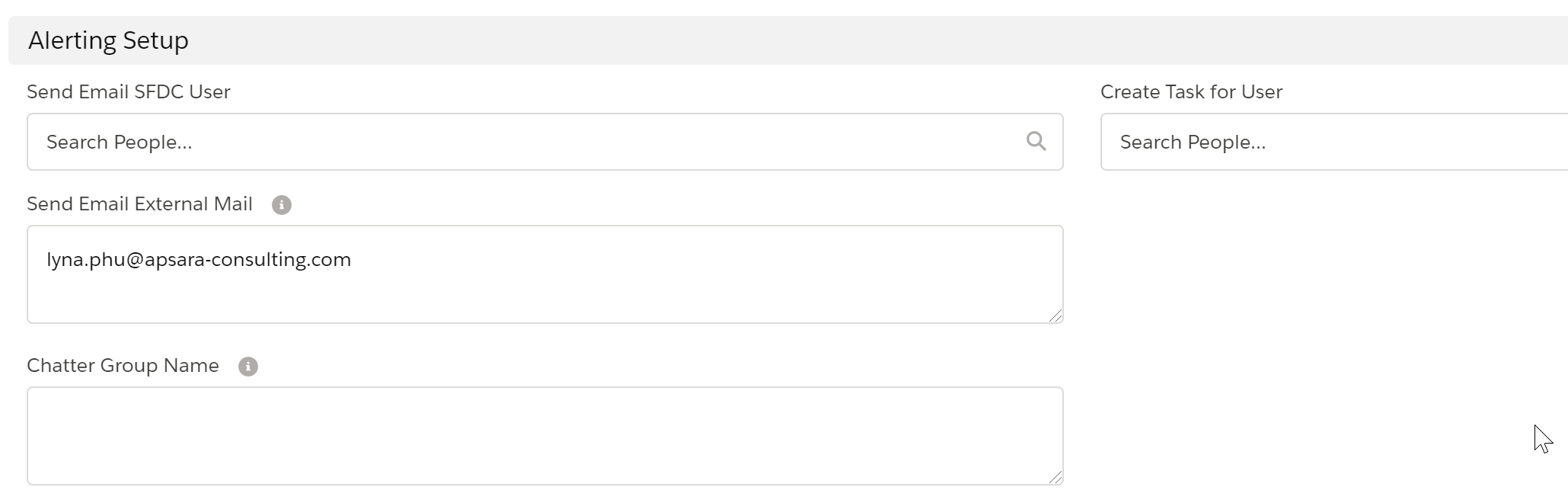
SKYVVA adds a native alerting component to the Salesforce platform. Alerts are sent directly and in real-time from Salesforce — you always see the true, original error text. Alerting can be defined at the integration or interface level, and delivered in four ways:
- External email
- Internal email linked to a Salesforce user
- Salesforce Task
- Chatter group notification

Value-Added #4 — Workflow
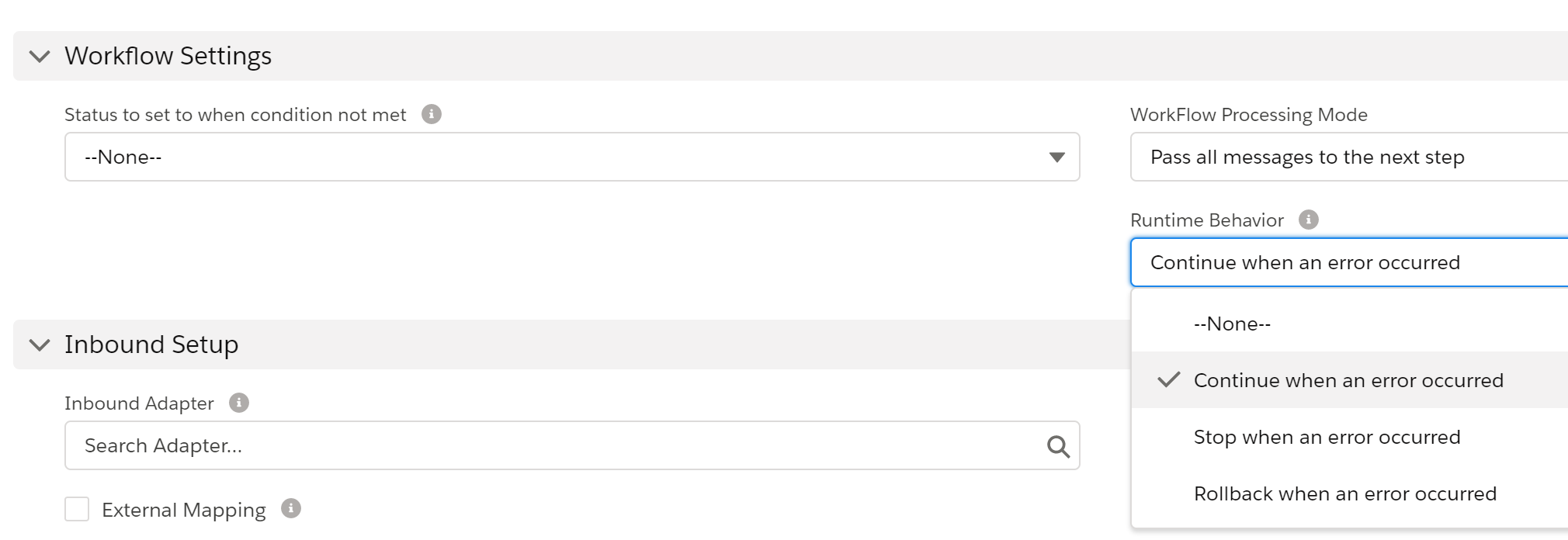
When using the Salesforce standard API to CRUD a sObject, there is no validation or check before the operation executes — it just runs and modifies the record immediately. In most integration scenarios, you need some validation before modifying your business records; otherwise, you risk data inconsistency.
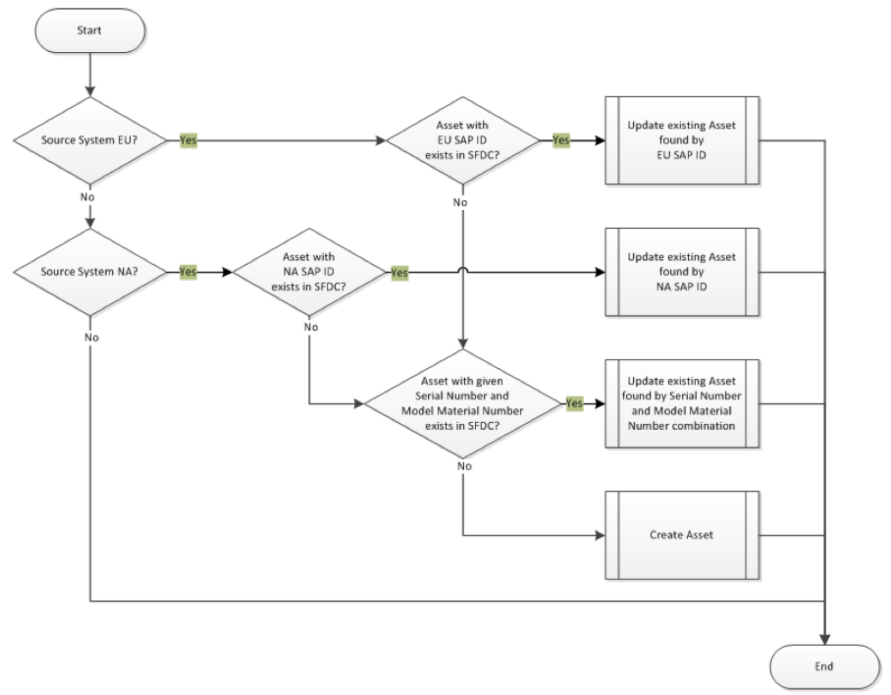
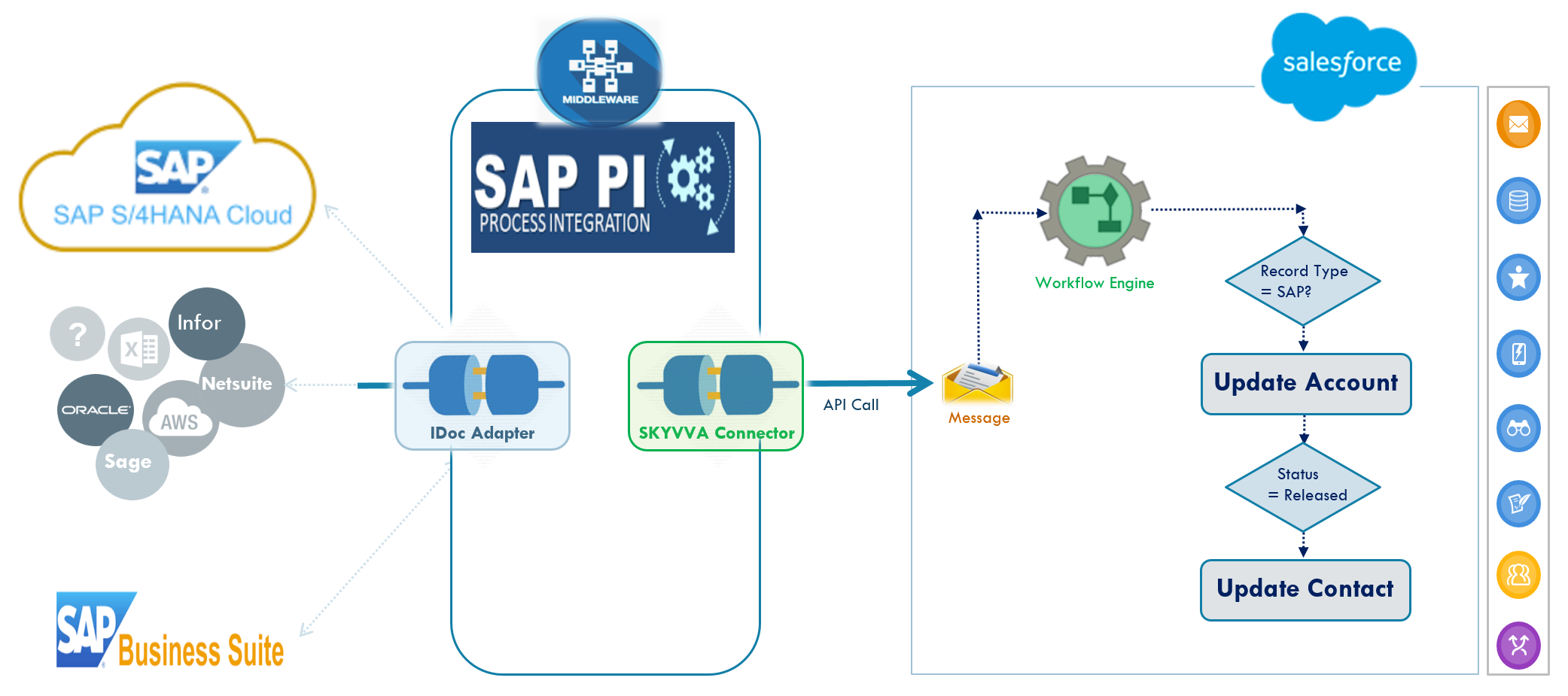
With the SKYVVA workflow, you can also define a chain of processing steps involving multiple interfaces. For example, you might modify both an Account and a Contact in a single API call — the workflow receives the data in one message and passes it through both the Account and Contact interface processing steps. This handles complex operations in a single call.
Value-Added #5 — Business Logic
A message is transferred as a payload from the middleware to Salesforce, and through the standard API you can CRUD a sObject. Sometimes that is enough. But many integration scenarios require business logic that goes beyond simple CRUD operations.
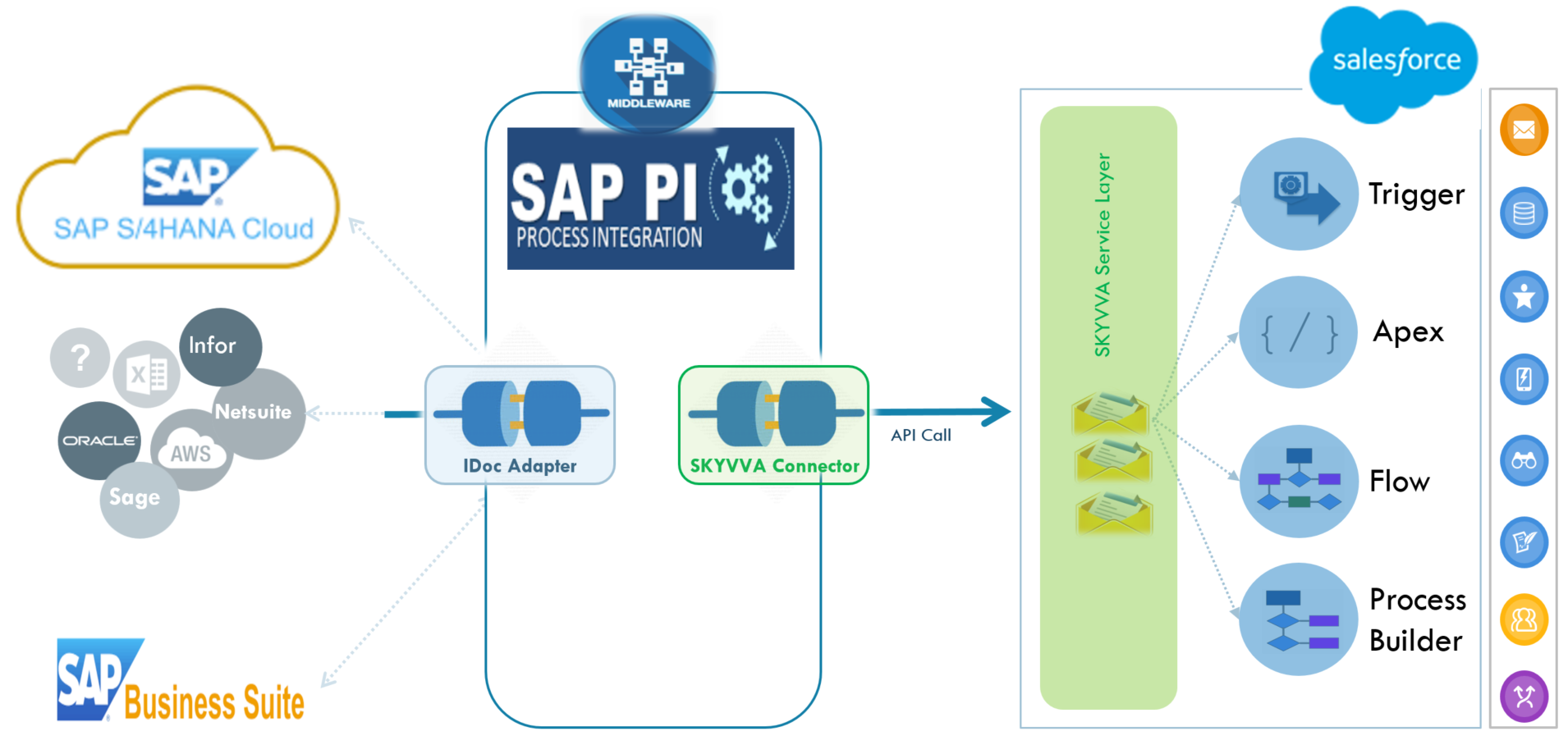
With SKYVVA, you can link an Apex class directly to an interface. When the message arrives at the SKYVVA layer, it executes your Apex logic where you can implement any business requirement. You can also use the full range of Salesforce's declarative tools:
- Developers: Apex triggers and Apex classes
- Admins (no-code): Process Builder and Autolaunched Flows
This allows you to add complex business logic to your data integration without pushing all the complexity to the middleware side — where it doesn't belong.
Value-Added #6 — Batch and Scheduling
Middleware-based integration is mostly used in application-to-application scenarios, where no end-user is directly waiting on the other side. For mass and high-volume data integration, batch and background processing is the right approach to optimize resources and performance.
The problem with the standard API is that it is not possible to delay processing or push it to run as a background job at a later time. SKYVVA adds a scheduler and job processing component to Salesforce:
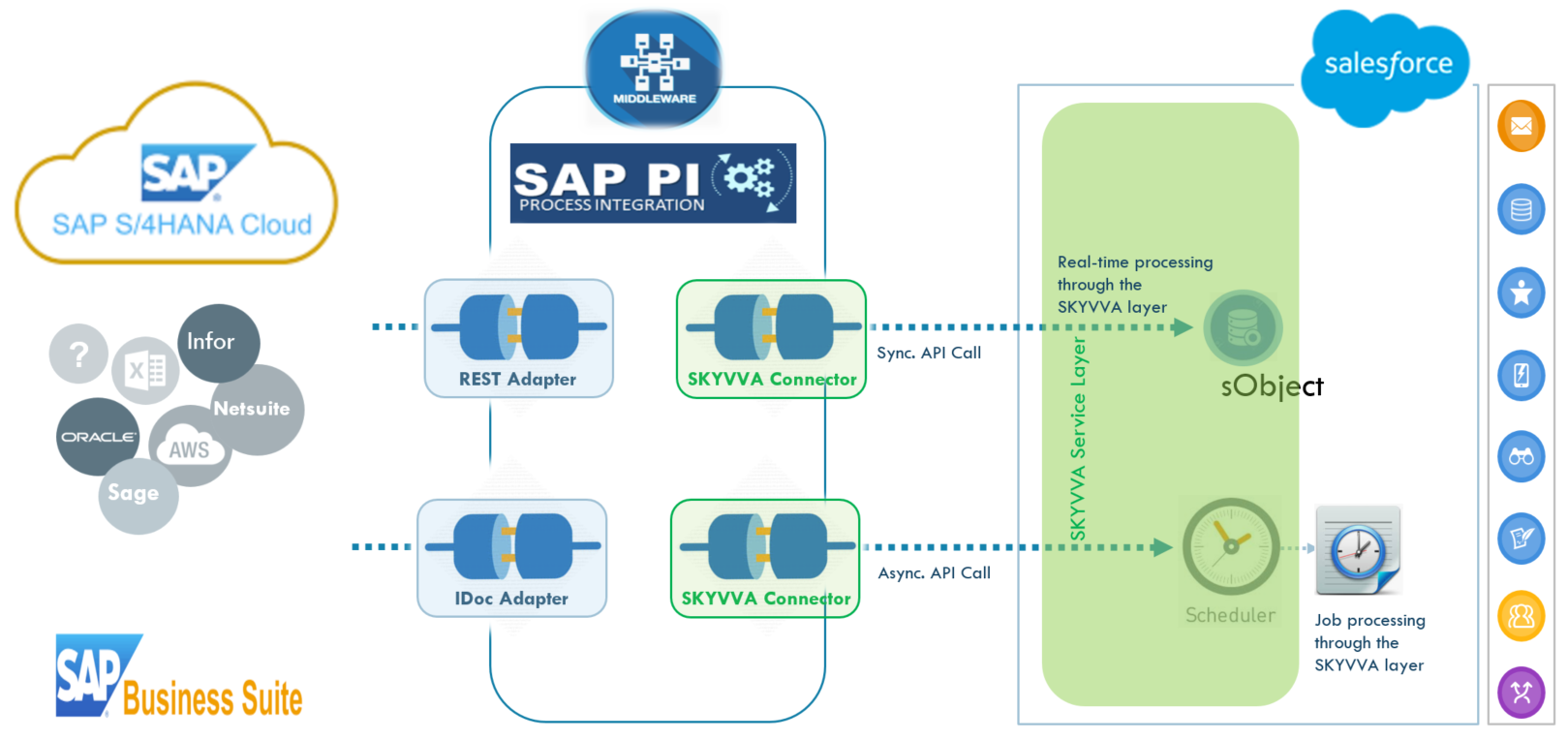
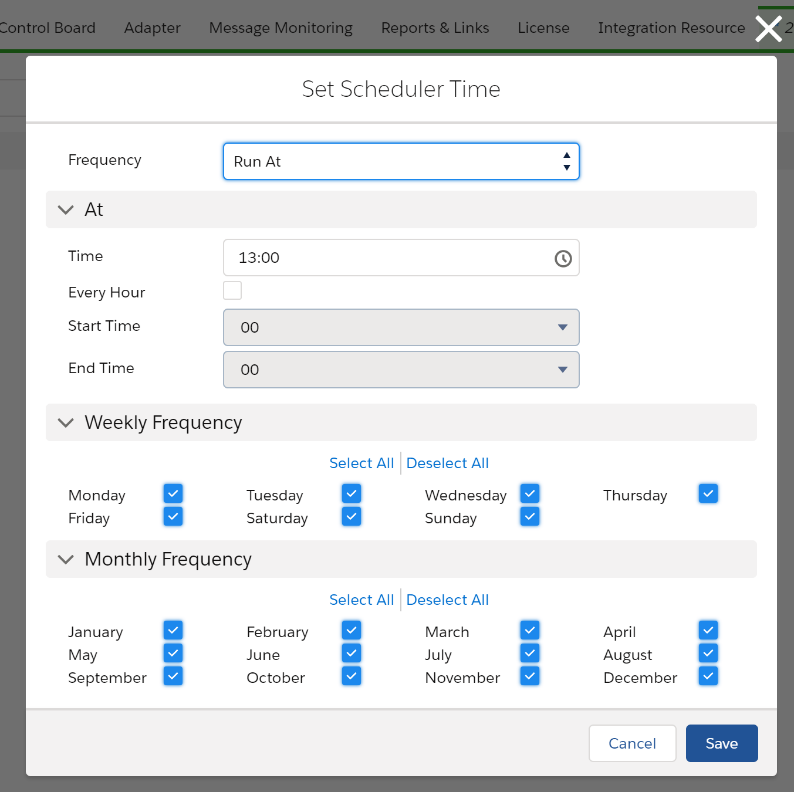
You can define the schedule in a flexible way: run every 15 minutes, run once at a specific time (e.g., 1:00 am), or run every hour within a window (e.g., 10:00 pm to 4:00 am). You can also select which days of the week or month to exclude from processing.
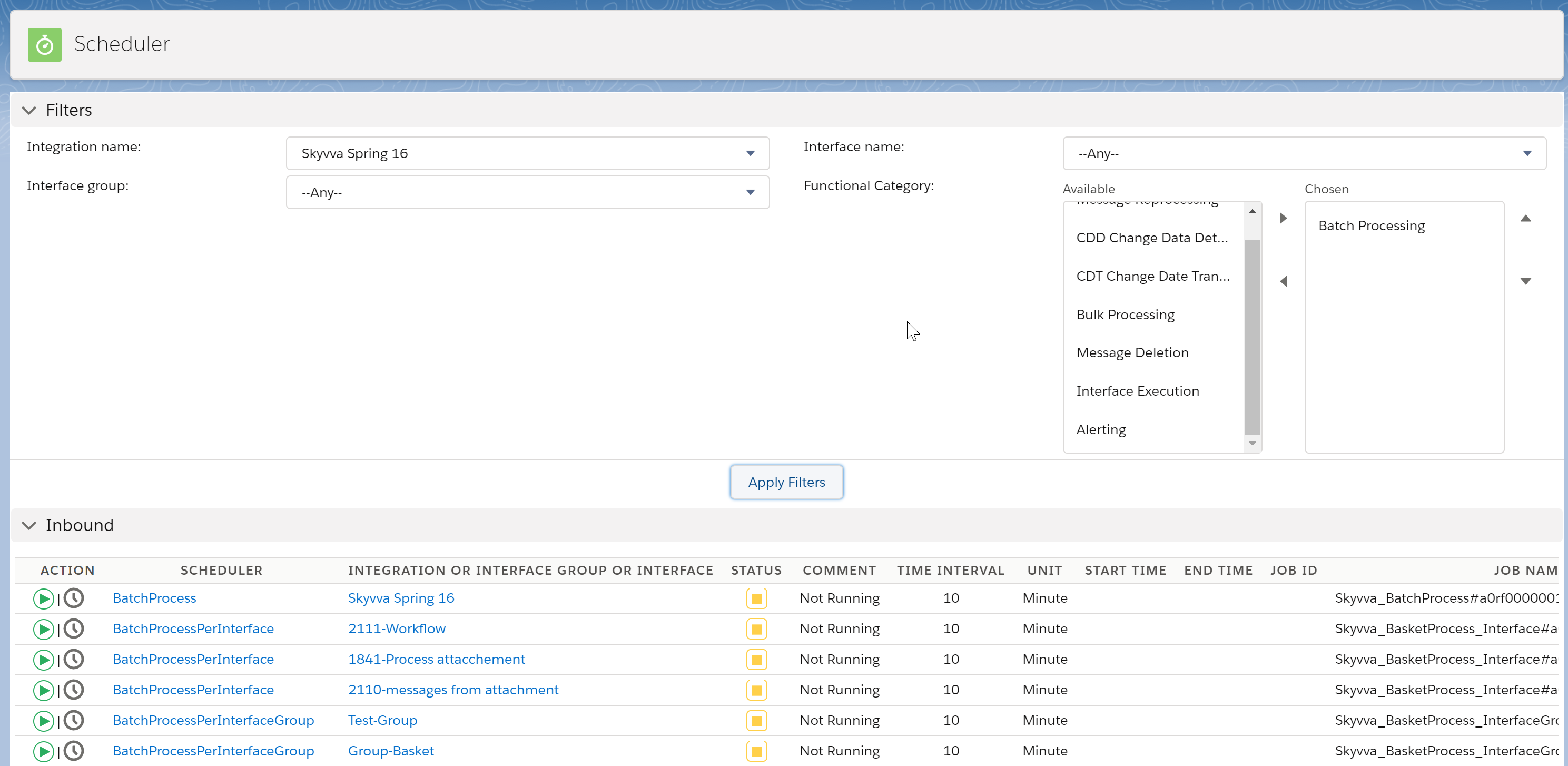
With batch processing and scheduling, you can push packages of 10,000 messages nightly from 10:00 pm to 6:00 am, every hour. This distributes the load and keeps Salesforce performing smoothly for end-users during business hours.
Summary
All six value-added features raise your integration quality to the next level, giving you the operational instruments to ease and simplify daily maintenance. This approach goes far beyond the simple API integration where only pure connectivity is available. When you want enterprise-class integration, the middleware-only approach is definitively not enough.
End-to-end monitoring and alerting increase quality and dramatically improve error handling and daily operations. Message reprocessing gives you a powerful tool to handle emergency cases where the sender system is temporarily unavailable. Workflow and business logic overcome the simplicity and limitations of basic CRUD operations, enabling complex business scenarios without putting logic in the wrong place. And batch and scheduling decouples the sender from the receiver, creating less dependency and optimizing performance for mass-volume data processing.
See the difference. Enhance your middleware integration with SKYVVA value-added features. Request a demo or trial to experience the full platform firsthand.
Ready for Enterprise-Grade Integration?
Request a demo and see how SKYVVA's native Salesforce integration layer transforms your integration landscape.
Request Demo →